AI Automation in Cibolo: Guide for Local Businesses

What if the most useful AI project for your Cibolo business isn’t a chatbot, but a smoother way to handle a recurring handoff? Repetitive administration and disconnected tools can consume staff time, while a generic AI tool may add another layer instead of fitting the workflow. A practical approach to ai automation cibolo businesses can build on starts with the process, not the technology.
Everyday friction can point to a promising workflow: information copied between systems, routine requests that need sorting, or tasks that follow the same steps each time. To automate well, first understand where decisions belong, what information needs to move, and when a person should review the result.
This guide explains how to identify a suitable workflow, assess its readiness, and connect AI with the tools and people already involved. You’ll also learn what implementation can involve, from process discovery and tailored engineering to oversight and data handling. With that foundation, AI automation can become a useful part of how your business operates rather than another disconnected tool.
Key Takeaways
- Start with a defined, repeatable business process rather than trying to automate every task or decision.
- Trace how information moves through the workflow to see where existing applications, AI, and human review need to connect.
- Evaluate an ai automation cibolo opportunity by considering task frequency, process stability, data quality, and review requirements.
- Set clear measures of success before development so your team can assess whether the solution improves capacity or consistency.
- J3 Automated Systems takes projects from workflow discovery and requirements mapping through tailored development and implementation.
AI Automation in Cibolo: Which Business Frictions Is It Designed to Reduce?
For a Cibolo business, the drag often comes from small tasks repeated throughout the day: copying details from a form into a business system, sorting incoming documents, or forwarding a request to the right person. Each step may seem manageable on its own. Together, they create handoffs, delays, and scattered information that make it harder for staff to focus on work requiring judgment and customer attention.
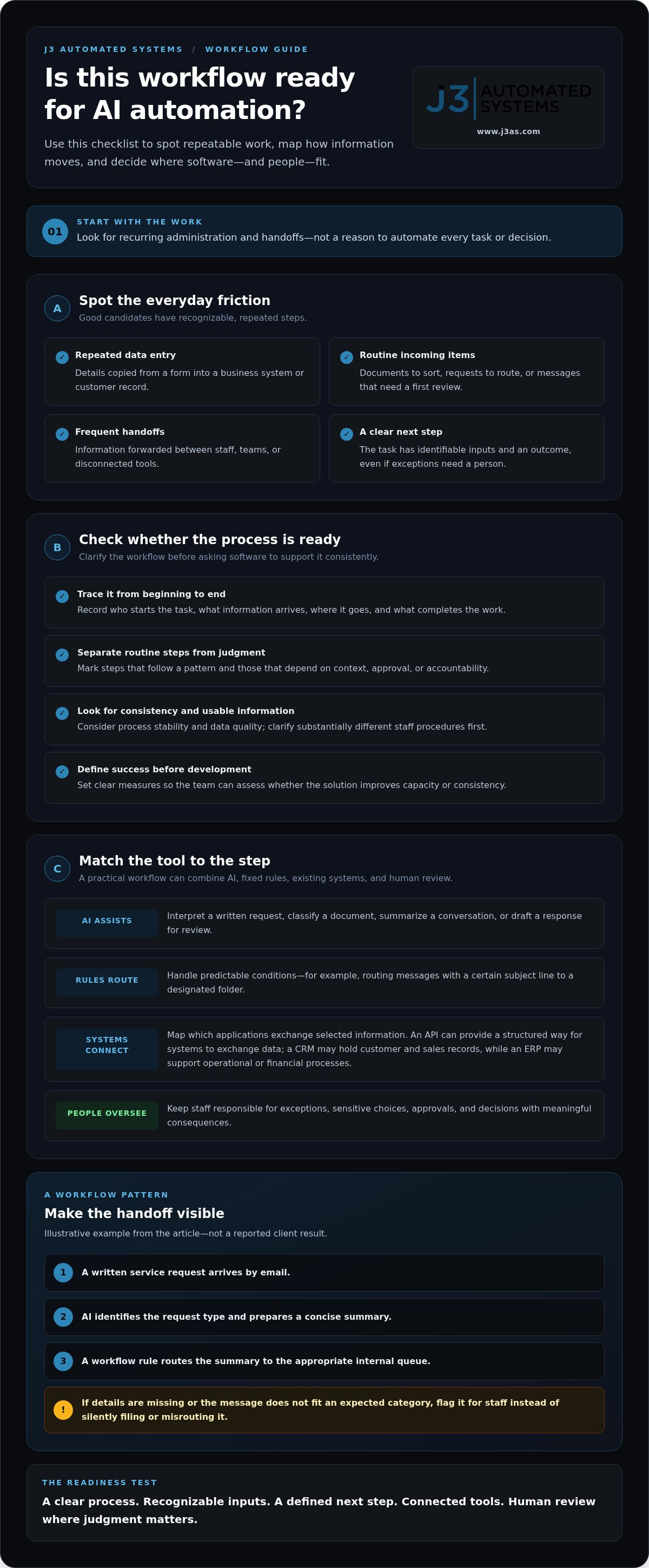
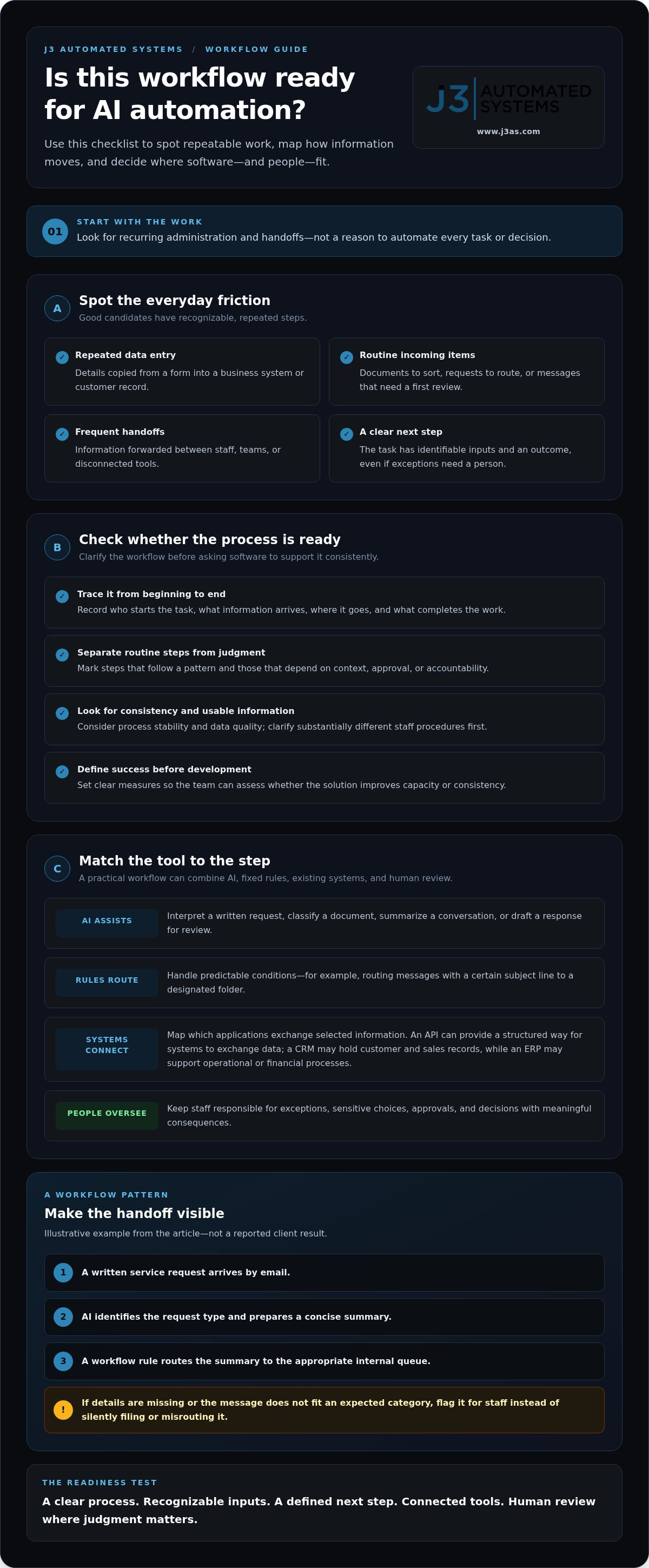
AI automation is software that uses artificial intelligence to assist with or carry out defined steps in a business workflow, while people retain oversight of decisions that need judgment. The goal isn’t to automate every task or hand decision-making over to a machine. It’s to design a process where software handles appropriate, repeatable work and staff remain responsible for exceptions and consequential choices.
What does AI automation mean for a Cibolo business?
AI can interpret a written request, classify an incoming document, summarize a conversation, or draft a response for an employee to review. Rules-based automation handles predictable conditions. For example, a shared inbox rule might route every message with a certain subject line to a designated folder. AI can help when the request’s meaning matters, even if its wording varies.
A useful workflow can combine both approaches. An incoming request might trigger the process, AI could identify its topic and prepare a summary, and fixed rules could assign it to the appropriate team queue. An employee can review the summary before taking action. This differs from simply using a standalone AI application: workflow automation connects a specific task to relevant information, existing systems, and human checkpoints.
AI capabilities and their wider social implications are part of a broader discussion, including the concept of AI takeover. For a business process, the practical design questions are more specific: what should the software do, what information can it use, and where should a person review its work?
Which operational signals suggest a workflow may be suitable?
Look for work that recurs, takes staff time, and follows a recognizable pattern. Repeated data entry between a form and a customer record, handling routine documents, and responding to internal requests are useful candidates to examine. A strong starting point has clear inputs and a clear next step, even if some exceptions still need a person.
Before proposing automation, describe the workflow from beginning to end. Note who starts it, what information arrives, where that information goes, and what outcome completes the task. Then identify which steps are routine and which depend on context, approval, or accountability. If staff follow substantially different procedures, clarify the process before asking software to support it consistently.
Keep human review where an error could have meaningful consequences or a decision is sensitive. AI might organize information or prepare a draft, while an authorized employee verifies details and approves the action. Defining this boundary gives the system a clear role and helps the team use AI assistance without treating every output as a final decision.
How AI Automation Connects Cibolo Workflows, Data, and Existing Systems
Useful automation fits the route information already takes through a business instead of creating a separate destination staff must remember to check. Define how a task starts, what information it needs, which systems should receive an update, and where a person must review the result. For ai automation cibolo projects, connecting the workflow to existing tools is what separates practical integration from another disconnected application.
How does AI fit into a business workflow?
A workflow often begins with a trigger, such as a form submission, email, or uploaded document. AI can interpret less-structured input by extracting details, classifying its purpose, or preparing a summary. Workflow rules then direct the next defined step, such as placing information in a review queue or updating a record. Staff can check or correct the AI-generated output before it moves forward.
Hypothetical example: A service business receives a written request by email. AI identifies the request type and drafts a concise summary, then a workflow rule sends both to the appropriate internal queue. If required details are missing or the message doesn’t fit an expected category, the process flags it for staff instead of silently filing or routing it incorrectly. This example illustrates a possible design, not a reported client result.
That pattern keeps exceptions visible. Teams can set review points, assign responsibility for approval, and decide what should happen when information is incomplete or uncertain. For a broader look at the principles behind AI business process automation, consider how each automated action fits into the full operating process rather than viewing AI as an isolated feature.
What does integration with existing business software involve?
Integration connects a workflow to the applications where staff already manage information. An API, or application programming interface, provides a structured way for software systems to exchange selected data. A CRM may hold customer and sales records, while an ERP may support operational or financial processes. The connection depends on the workflow and on how those systems manage information. Organizations exploring private enterprise deployment can discover REAS 睿思智慧 to see how dedicated integration platforms connect internal systems with AI capabilities.
Before engineering begins, map the handoffs and establish a few essentials:
- Data ownership: Identify which system is the authoritative source for each important field.
- Permissions: Define what information the workflow can access and which actions it can take.
- Handoffs: Specify where updates go, who reviews them, and how exceptions return to staff.
- Interface needs: Determine whether employees need a tailored screen to manage the process clearly.
When existing screens don’t support a workflow well, a tailored internal tool can give staff a clearer view of its steps and status. Explore custom web app development as one way to shape an interface around operational needs. Businesses planning a connected workflow can also learn how J3 Automated Systems approaches AI business process integration, from process understanding through implementation.
How Cibolo Businesses Can Evaluate an AI Automation Opportunity
The best candidate isn’t necessarily the most complex process or the task that attracts the most attention. Look for a workflow where repeated effort, clear steps, and manageable exceptions create a reasonable case for improvement. For ai automation cibolo planning, compare candidate workflows against consistent criteria before committing to development.
Which workflow should a Cibolo business assess first?
Start with recurring administrative work that has visible inputs and outcomes, such as routing internal requests or transferring information between records. Separate these tasks from decisions that depend on nuanced context, negotiation, or professional judgment. In areas like talent acquisition, specialized providers such as BlueBridge Group Placement Corp apply AI-driven employment solutions to streamline candidate pipelines while keeping core hiring decisions in human hands. Automation can support the flow of information without taking over the decision itself.
Before comparing ideas, document how each process works today. Record the steps, handoffs, delays, rework, and people involved. This creates a baseline and may reveal that the friction comes from an unclear procedure or missing information, not simply from the absence of AI.
How can teams weigh value against implementation complexity?
Use a simple comparison to identify strengths and risks. A workflow doesn’t need perfect scores across every dimension, but weak data or frequent exceptions may call for process improvements or stronger review before automation.
| Factor | What to assess | Promising signal |
|---|---|---|
| Task frequency | How often does the task occur, and how much staff attention does each instance require? | Regular work that consumes measurable time. |
| Process stability | Do people generally follow the same steps and aim for the same outcome? | A clear sequence with a limited number of exceptions. |
| Data quality | Is necessary information available, consistent, and accessible to the workflow? | Reliable inputs with identifiable sources. |
| Review needs | How costly would an incorrect output be, and who should verify it? | Review points can be defined and assigned. |
Estimate potential value in terms of staff capacity and consistency, not guaranteed savings. Establish a baseline first: count how many cases arrive, measure active handling time, note time spent waiting between handoffs, and track corrections or exceptions. After implementation, compare the same measures. A process may be valuable because it frees employees to handle work that needs their expertise, even if it doesn’t eliminate a role or produce a direct cost reduction.
Balance that potential against integration effort, data access, exception handling, and the consequences of a mistaken result. A bounded initial workflow makes evaluation more manageable. Define its starting point, expected output, review owner, and limits. Staff can retain judgment through deliberate approval steps, with uncertain or consequential cases directed to a person. Expand only after the workflow performs as intended and baseline measures show whether it improves the operation.
A Practical AI Automation Roadmap for Cibolo Organizations
A reliable implementation moves in stages, from understanding the work to evaluating how the finished workflow performs. For businesses considering ai automation cibolo, a clear roadmap helps avoid a common misstep: developing a tool before agreeing on the process it should support. Define the operational goal first, then shape the technology around it.
What happens during discovery and process mapping?
Discovery documents how work actually moves, including process owners, inputs, decisions, systems, handoffs, and known bottlenecks. The team then agrees which steps AI may assist with and which decisions remain with staff. Before development, establish baseline measures such as handling time, error frequency, or backlog, so later evaluation has a meaningful point of comparison.
- Define the objective. Describe the friction the project should address, such as delays in processing routine requests or repeated manual handling of information. Keep the objective specific enough to guide design.
- Map the current process. Trace the workflow from its trigger to its intended outcome. Record the roles involved, information used, handoffs, exceptions, and systems touched, including informal steps that may not appear in written procedures.
- Set boundaries and measures. Decide where AI can assist, where staff must review or approve, and what happens when an input is incomplete or unusual. Choose measures before development begins, such as time spent per case, correction frequency, or volume waiting in a queue.
- Engineer the workflow. Translate the agreed process into a tailored solution. Define how information moves between applications, who can access it, and how staff see work requiring attention. Include permissions and security in the design, not just in a final checklist.
- Test, implement, and evaluate. Exercise the workflow with representative cases and exceptions, gather staff feedback, refine the design, and evaluate performance against the baseline measures.
How should a business test and refine an automation?
Testing should include routine inputs and edge cases, such as missing fields, ambiguous requests, or information that doesn’t fit the expected pattern. Check whether outputs are suitable for their intended use, exceptions reach the right person, and access permissions match the workflow’s boundaries.
Staff feedback matters, too. Employees can identify confusing review steps, overlooked exceptions, or extra work created by the process. Use those observations to adjust the workflow before considering wider use. Change management should clarify what the system handles, when employees need to intervene, and how they can report issues. This gives people a defined role in the transition instead of asking them to trust an unfamiliar process without guidance.
A disciplined roadmap connects discovery, process mapping, engineering, and implementation in one accountable project. Start planning a tailored AI workflow with J3 Automated Systems.
AI Automation in Cibolo with J3 Automated Systems: From Workflow Map to Implementation
AI automation works best when it reflects how a business actually operates. J3 Automated Systems provides custom software development, internal business tools, and AI integration for repetitive administrative workflows. For Cibolo businesses and organizations in San Antonio, New Braunfels, Seguin, Bandera, Boerne, Austin, and San Marcos, J3 connects operational needs to tailored solutions rather than treating AI as a standalone application alongside existing work.
What does a tailored AI automation project address?
A tailored project starts with the process and the tools already involved. If a team spends time organizing routine information, for example, the project can examine how that information arrives, who needs to act on it, and where the workflow slows down. Those requirements shape how AI supports the process and how the result fits into existing operations.
Custom internal applications can give employees a clear place to view or manage workflow information. That can help when steps, approvals, or status details don’t fit naturally into current interfaces. The design should follow the work: which information staff need, what actions they’re responsible for, and how exceptions remain visible. This keeps the solution grounded in operational needs instead of forcing the team to adapt to a generic process.
For businesses exploring ai automation cibolo, value comes from connecting process requirements, AI assistance, business information, and staff oversight. The technical design follows from those decisions, not the other way around.
How does J3 keep the work connected from planning to implementation?
J3 brings discovery, engineering, and implementation together under one accountable team. Each stage informs the next. The team discovers how the workflow operates, maps its requirements, develops a tailored solution, and implements it as part of an end-to-end project.
During discovery, the focus is on the actual process: the people involved, the information they use, the systems they depend on, and the steps that create friction. Mapping turns those observations into requirements, including where AI can assist, what should happen when an exception occurs, and which decisions stay with employees. Those choices guide the technical design and keep implementation aligned with the original operational goal.
Implementation brings the designed workflow into the business’s working environment. Custom software and AI integration can be shaped around existing processes, with attention to how staff interact with the solution and how it connects to work already underway. This end-to-end approach carries the intent established during discovery through to a functioning workflow.
If your Cibolo-area organization is ready to explore a defined administrative workflow, discuss an automation project with J3 Automated Systems. Start with the operational friction you want to address, so the conversation can focus on how a tailored workflow might fit your business.
Choose the Next Workflow to Improve
The next step doesn’t need to be a sweeping technology initiative. Start with one recurring operational friction, then consider what a more deliberate process could make possible: clearer handoffs, steadier information flow, or more time for work that calls for human judgment. That focused starting point gives ai automation cibolo a practical direction grounded in how your business wants to work.
J3 Automated Systems can carry that intent from discovery into a tailored implementation, combining custom software and internal tools with AI integration into existing workflows. One accountable team guides the work across planning and engineering, so your operational needs can shape the solution. J3 serves businesses throughout Texas, including San Antonio, New Braunfels, Seguin, Bandera, Boerne, Austin, and San Marcos.
Bring forward the workflow that creates the most avoidable friction and what a better process should help your team accomplish. Discuss an AI automation project with J3 and take a considered first step toward a more connected operation.
Frequently Asked Questions
Can AI automation work with the software my Cibolo business already uses?
AI automation can often be designed to work with existing business software, depending on the systems and the workflow. For example, a process might take approved information from an internal form and use it to prepare an update for a business record. Before development, clarify which system owns each piece of information and what access the workflow needs. J3 Automated Systems serves businesses throughout Texas, including San Antonio, New Braunfels, Seguin, Bandera, Boerne, Austin, and San Marcos.
Is AI automation suitable for a small business in Cibolo?
A small business may benefit when a clearly defined administrative task repeatedly draws attention away from customer service or core work. A suitable starting point might be organizing routine inquiries or preparing information employees currently assemble by hand. Keep the first project focused, with a clear way to assess its usefulness. For ai automation cibolo, the objective is a workflow scaled to the business’s actual needs, not technology for its own sake.
Does AI automation replace employees or human decision-making?
AI automation can support employees without replacing their responsibility for decisions. A business might use it to organize incoming information or prepare a draft, while a staff member reviews the details and decides what action to take. The important design choice is where approval stays with a person. For decisions involving sensitive information, unusual circumstances, or meaningful consequences, define an explicit human review point rather than treating an automated output as final.
How much does AI automation cost for a Cibolo business?
The cost depends on the project’s scope, including how the workflow operates, which systems it needs to work with, and whether custom software or an internal tool is required. A well-defined process is easier to assess than a broad request to “add AI.” Prepare a description of the task, its users, relevant systems, and expected boundaries. J3 provides project-based engineering for tailored software and AI integration, with fees shaped by the work involved.
How long does it take to implement AI automation?
Implementation time varies with workflow complexity, system access, data readiness, and the amount of testing and staff feedback required. A process with clear requirements may involve different work from one with multiple handoffs or unresolved exceptions. Rather than relying on a generic time estimate, clarify the project stages and what decisions or materials your team needs to provide. That makes the work easier to plan and keeps expectations tied to the actual scope.
What happens when an AI automation encounters an unusual case?
A carefully designed workflow routes uncertain or out-of-pattern cases to a person instead of forcing an automated response. For instance, if a request is missing essential information or doesn’t match an expected category, the system can flag it for employee review. Teams should decide who receives the alert, what context they need, and how the corrected outcome informs the process. This keeps exceptions visible and gives staff a clear way to intervene.
What should a business measure before automating a workflow?
Record how the current process performs before changing it. Useful measures include the number of cases handled, staff time spent on each, correction frequency, and work waiting in a queue. Choose measures that reflect the intended improvement: a workflow designed to reduce manual review may need a different baseline than one intended to improve consistency. Keep the measurement method consistent after implementation so the team can make a grounded comparison.
Can AI automation connect business processes with building systems?
It can be considered as part of a broader integration project, but define the business purpose and system boundaries first. Commercial building automation, such as HVAC or building management systems, addresses building operations; AI business process integration addresses administrative workflows. A proposed connection would need to specify what information should move between them, who can access it, and what action is appropriate. J3 works across both building automation and business-process engineering.