AI Automation in Seguin, TX: From Repetitive Work to Reliable Workflows

What if the work slowing your Seguin business isn’t complex, just repeated across too many systems? That’s the question behind “ai automation Seguin”: can it reduce administrative friction without adding another fragile tool?
When staff re-enter information, chase approvals, or move details between platforms by hand, the process takes attention away from other work. Reliable automation starts with a clear view of how work flows today, where delays occur, and what the improved process should accomplish. It doesn’t mean automating everything at once.
This article explains where AI automation can support a Seguin business and how to assess a suitable first workflow. You’ll learn how to set measurable goals, plan for data access and ownership, and connect a custom solution with the tools your team already uses. J3 Automated Systems brings workflow discovery, custom software development, AI integration, and support together in a tailored engineering process, helping businesses move from repetitive work toward dependable workflows.
Key Takeaways
- Separate AI-assisted decisions from rules-based automation to identify which steps need human judgment and which can follow consistent instructions.
- Map the workflow before designing a solution; documenting handoffs, duplicate entry, and exceptions reveals where automation may fit.
- Use repeatability, clear ownership, measurable impact, and manageable exceptions to compare candidate workflows and select a practical first project.
- For ai automation seguin, plan around existing systems, data access, permissions, and review responsibilities before integration begins.
- See how a connected process of discovery, custom development, integration, implementation, and support can turn business requirements into a tailored workflow.
What AI automation in Seguin can and cannot do for business
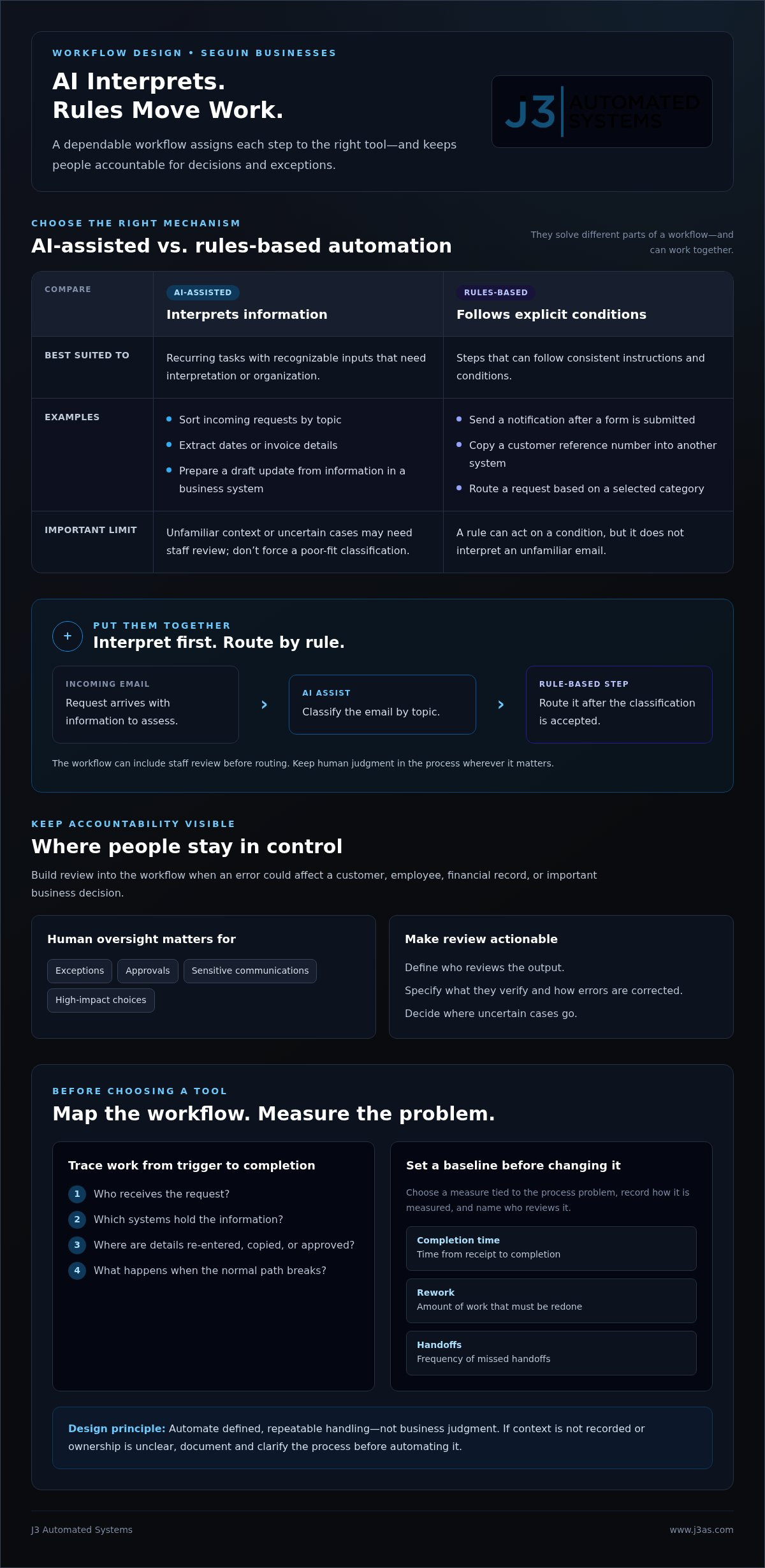
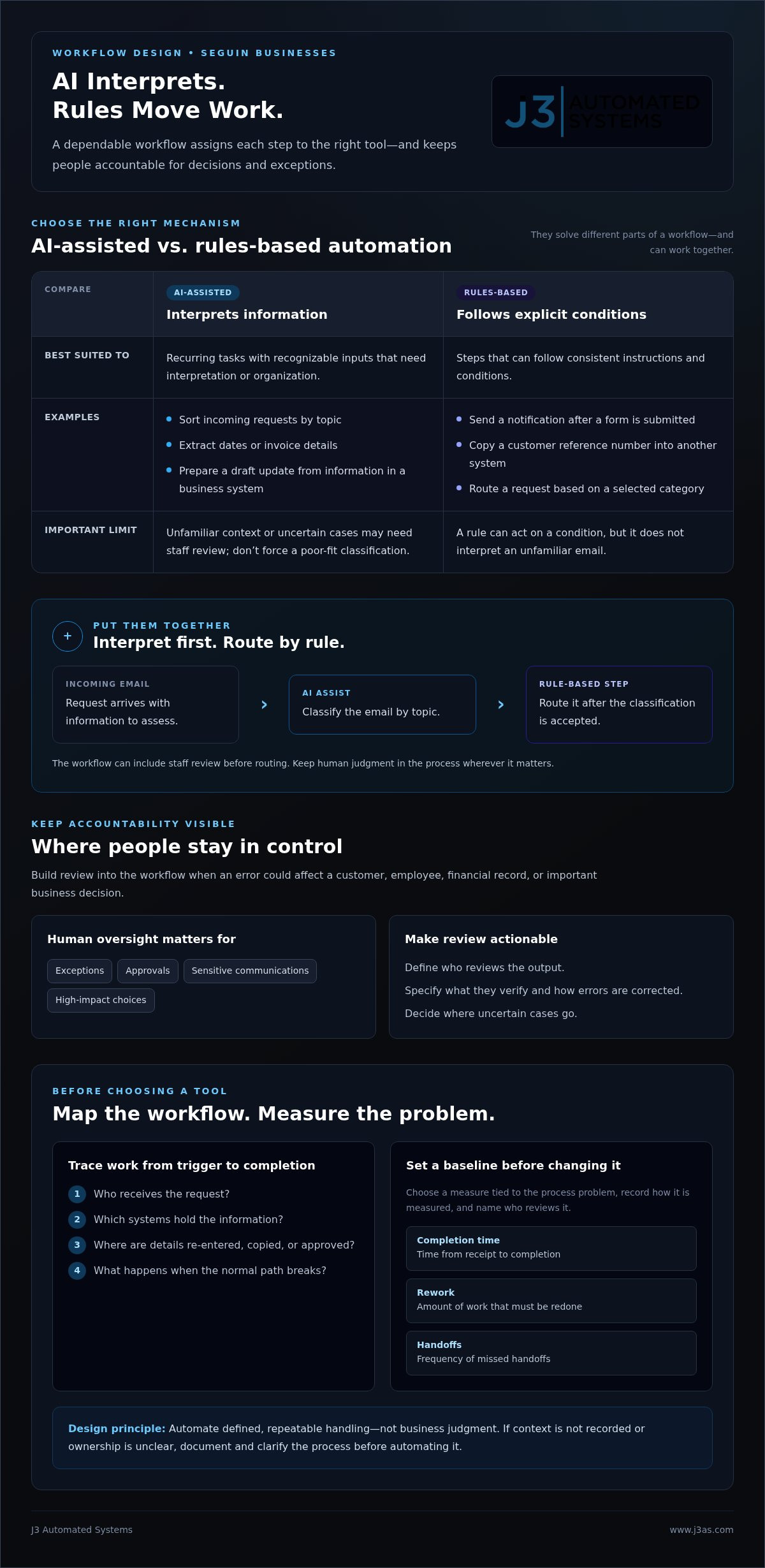
For a business considering ai automation seguin, the useful starting point isn’t a promise of autonomous operations. It’s a defined workflow in which software handles specific steps, people remain responsible, and outputs can be checked against clear expectations. AI can interpret text or organize information, while rules-based automation moves data or triggers an action according to set conditions. A well-designed process uses each where it fits.
AI automation is software applying AI within a bounded business workflow to assist with or complete defined tasks, while people remain accountable for decisions and exceptions. Automating a step doesn’t transfer business judgment to a machine. For a broader overview of how AI and process automation work together, see Intelligent Automation Explained.
Which business tasks are suitable for AI automation?
Recurring tasks with recognizable inputs and defined outputs are usually easier to scope than work that changes substantially from case to case. For example, AI could sort incoming requests by topic, extract dates or invoice details from documents, or prepare a draft update using information already recorded in a business system. Staff can review the result and decide what happens next.
Rules-based automation works differently. A rule can send a notification when someone submits a form, copy a customer reference number into another system, or route a request based on a selected category. It follows explicit conditions; it doesn’t interpret an unfamiliar email. AI might classify the email, then a separate rule can route it after a person or the system accepts the classification. Combining the two can keep a workflow from depending on AI for every step.
Before selecting a task, describe its starting information, expected result, and known variations. If staff can explain the normal path and identify where judgment enters, the task is easier to design and test. If the process relies on context that isn’t recorded, document that context before automating the step.
Where should people remain in control?
Keep review points wherever an error could affect a customer, employee, financial record, or important business decision. Exceptions, approvals, sensitive communications, and high-impact choices call for human oversight. AI can organize relevant details or prepare a draft, but an authorized staff member should make consequential decisions and approve communications that require context, tact, or accountability.
Build oversight into the workflow rather than relying on an informal instruction to “check the AI.” Define who reviews the output, what they verify, how they correct an error, and where an uncertain case goes. For instance, a request that doesn’t match established categories can be flagged for staff instead of forced into the closest option. Corrections can also reveal whether instructions, data, or routing rules need adjustment.
AI won’t suit every task equally. A process with inconsistent inputs, unclear ownership, or decisions that depend on tacit expertise may need redesign before automation. As GenAI coaching firms like Navo Inc. emphasize when developing synthetic workforces and deploying AI agents, the goal isn’t to remove people from the process. It’s to reduce repetitive handling while preserving human control where it matters.
How an AI automation workflow works, from discovery to daily use
A dependable workflow begins with the business process, not a tool selection. For an ai automation seguin project, first understand how work moves today, decide what should change, and introduce automation in a controlled way. Oracle’s overview of the Benefits of AI Automation in Business describes how AI capabilities can work with automation. In practice, their value depends on fitting them to a specific process and its responsibilities.
Map the process before selecting an AI tool
Trace the workflow from its trigger to completion. Record who receives the request, which systems hold the information, where staff enter or copy details, who approves the next step, and what happens when the normal path breaks. A simple process map can expose duplicate entry, waiting periods, unclear handoffs, and decisions that rely on employee judgment.
Set a baseline before changing the process. Choose a measure tied to the problem, such as time from receipt to completion, the amount of rework, or the frequency of missed handoffs. Record how it’s measured and who will review it. Name a workflow owner who can answer process questions, coordinate staff feedback, and confirm that the new method still meets the business need.
Discovery should also separate steps that can follow consistent rules from steps that require interpretation. This helps determine where AI may assist, where a direct system-to-system rule is enough, and where an employee must remain responsible. J3’s wider AI business process automation approach connects workflow discovery with design, integration, implementation, and support.
Build, connect, and test a controlled workflow
Once the current process is understood, design the intended sequence: what starts it, what information moves, which system receives each update, and where a person reviews or approves an output. Integration planning should account for existing software, user permissions, and the path information takes between systems. Define what happens when required information is missing, an output is uncertain, or a connection fails.
Test before relying on the workflow in daily operations. Use realistic examples that represent routine requests and known exceptions. Ask the staff who perform or oversee the work to check whether information is accurate, updates reach the right place, and review steps are clear. Record errors and confusing handoffs, revise the design, and test again. A controlled pilot keeps the first deployment limited enough to learn from without assuming every case will behave as expected.
Before expanding use, compare results with the baseline and check whether the process is more consistent on the measure that matters. Review staff feedback and unresolved exceptions, too. If the intended outcome isn’t evident, refine the workflow rather than widening its reach. A measured rollout gives the owner a clear basis for deciding what to adjust, maintain, or extend; for insights into taking workflows beyond initial trials into production, discover pronix.ai.
Which Seguin business process should you automate first?
The best first workflow isn’t necessarily the largest or most visible one. A practical plan for ai automation seguin weighs whether a process repeats consistently, has a clear owner, can be measured, and handles exceptions without constant judgment. IBM’s discussion of AI-powered automation also emphasizes how automation can support people’s work rather than make human expertise irrelevant.
Clear ownership makes a workflow easier to prepare for automation because someone can define success, resolve exceptions, and take responsibility for the process over time. Use the criteria below to compare possible starting points, not as a guarantee that automating any one task will produce a particular return.
Compare candidate workflows by readiness and value
Start with routine work staff can describe clearly, such as transferring recurring information, handling standard documents, routing incoming leads, or coordinating task updates. A modest process with a predictable beginning and end may be a stronger first project than a broad initiative spanning several departments and requiring frequent case-by-case decisions.
| Candidate process | Potential fit | Human review | Possible measure |
|---|---|---|---|
| Recurring data entry | Strong if the source and destination fields are consistent | Review incomplete or mismatched records | Rework or entry errors observed |
| Document handling | Good when documents follow recognizable formats | Verify extracted details before consequential use | Processing time or correction frequency |
| Lead routing | Good when routing criteria are defined | Review uncertain or unusually complex inquiries | Routing accuracy or time to assignment |
| Task coordination | Good for repeatable reminders and status updates | Resolve blocked work or priority conflicts | Missed handoffs or overdue tasks |
Choose measures you can observe before and after implementation, such as completion time, routing corrections, repeated data fixes, or overdue tasks. These indicators help test whether the workflow is operating as intended. Don’t treat possible staff time released as guaranteed savings or present an untested estimate as a return on investment.
Recognize processes that need more preparation
Some workflows need more preparation because employees follow different procedures, nobody owns the source data, or exceptions are more common than the standard path. A process involving frequent judgment, such as resolving unusual customer concerns, is less bounded than transferring a consistent set of approved details between systems. Automating it too early can encode inconsistent practices rather than improve them.
That’s a reason to clarify the process, not necessarily abandon the idea. Document who makes each decision, which information is authoritative, and what distinguishes a routine case from an exception. You may then identify a narrower supporting step, such as organizing incoming information for staff review, while leaving the judgment itself with a person. This creates a grounded starting point and a clearer basis for measuring whether the workflow is ready to expand.
How to prepare your Seguin business for AI workflow integration
Good integration begins with more than choosing a tool. For ai automation seguin, preparation means aligning the people, process, information, and existing systems around a defined business need. Understanding that operating environment helps shape a solution that fits how your team handles tasks instead of adding another disconnected step.
Align people, process, and data before implementation
Start with the people closest to the selected workflow. Assign an owner who can describe the usual process, explain where it varies, and identify who is accountable for each decision. Document what information the workflow uses, where it comes from, and which roles are authorized to view or update it.
Use this readiness checklist to clarify responsibilities before design begins:
- Workflow ownership: Name the person responsible for business decisions, process questions, and ongoing review.
- Information: Identify the data required at each step, its source, and who can access or change it.
- Staff review: Decide who checks outputs, approves sensitive actions, and corrects inaccurate information.
- Exceptions and issues: Define how unusual cases are routed and how staff report a problem with the workflow.
- Team adoption: Explain how the process will change and give affected employees a way to share practical feedback.
These details help keep responsibilities clear once software is involved. They also give the design team a grounded account of the workflow, including the information and permissions it must respect. If staff disagree about the correct procedure, align on the process first so the technology can support a shared approach.
Plan integrations around existing business systems
Inventory the tools involved in the workflow, including where information is entered, stored, reviewed, and passed to another person or system. Note manual updates and handoffs, along with the permissions needed for each action. Integration is a design question shaped by how existing systems exchange information, what access is available, and what the process requires. Different systems may call for different integration methods.
Set a baseline before implementation using a measure tied to the business objective, such as rework, processing time, or missed handoffs. After launch, measure the same indicator using the same method, then combine the result with staff feedback. This gives the process owner a practical way to assess whether the workflow is functioning as intended and where refinement may be needed.
Some requirements call for a custom web application or internal tool to bring steps and information into a better-aligned process. The project should connect design, integration, and implementation to the workflow and existing environment. Learn about planning an AI workflow integration with a tailored engineering approach.
J3's approach to AI automation for Seguin-area businesses
Reliable AI automation takes more than connecting software to a task. It requires understanding how the business works, where information travels, and which responsibilities must remain with people. For ai automation seguin, J3 Automated Systems brings workflow discovery, custom software development, and AI integration into one engineered process, connecting business requirements with a solution shaped for the operating environment.
From workflow discovery to a tailored implementation
J3 begins by learning how a process works in practice: what initiates it, which systems and people are involved, where information is repeated, and how exceptions are handled. That discovery establishes requirements before a solution is designed, helping distinguish steps suited to AI support, direct system rules, or human review.
Workflow mapping then informs design and development. When existing tools need a more tailored connection, J3 can develop custom web applications or internal tools around the process rather than forcing work into a generic pattern. Integration planning considers how information should move through the workflow and where staff need visibility or control. Testing and implementation bring the designed process into daily use, with support and refinement connected to the solution over time.
This approach is useful when a business process touches more than one system or team. An administrative task may begin with incoming information, require an employee’s review, and end with an update elsewhere. Treating those steps as one connected workflow helps align the software with actual handoffs and responsibilities. It also creates a clear point of accountability across discovery, development, integration, and implementation.
Define a practical next step for your business
Begin with one recurring process, not a broad mandate to automate everything. Note where staff repeat work, manually move information, wait for handoffs, or correct avoidable errors. Bring the workflow owner into the conversation, along with a baseline such as current processing time, rework, or missed updates. These details make the business need concrete and focus early planning.
J3 serves businesses in Seguin and surrounding Texas communities with custom software development and AI integration for existing workflows, supported by a single accountable team. This connects the operational need to an engineered solution without assuming every workflow needs the same design or level of automation. J3 also serves clients in San Antonio, New Braunfels, Bandera, Beorne, Austin, and San Marcos.
If your team has a recurring process that creates administrative friction, discuss an AI automation opportunity in Seguin with J3 Automated Systems. A clear view of the workflow and its current challenges is a practical place to begin.
Give your next workflow a thoughtful starting point
The next step in ai automation seguin doesn’t need to be a sweeping technology initiative. Choose a recurring process your team understands and consider how a better-designed workflow could create more room for attention, coordination, and considered decisions. Strong automation projects serve the business as it evolves, with clear accountability for how the process works and how it should improve.
J3 Automated Systems brings custom software development and AI integration together with end-to-end engineering, installation, and support for tailored automation solutions. Serving Seguin and communities across Texas, the team connects operational needs to technical design, helping businesses approach automation as an integrated project rather than a disconnected tool.
Bring one process in mind, along with the friction staff encounter and what a more dependable outcome would look like. That gives the conversation a practical focus and a foundation for exploring a workflow built around your existing operation.
Discuss an AI automation project with J3 and take a considered first step toward a workflow built around how your business works.
Frequently Asked Questions
Can AI automation work with the software my business already uses?
Often, yes, if the existing systems provide a practical way to exchange the information the workflow needs. For businesses exploring ai automation seguin, integration design depends on each system’s capabilities, access permissions, and data structure. Start by identifying the exact records or updates that need to move, such as a request status or customer detail. That makes it easier to plan a suitable connection or custom tool.
Will AI automation replace employees at my Seguin business?
AI automation is generally designed to handle defined tasks, not take responsibility for an employee’s full role. It might prepare a first draft or organize information, while staff bring context, resolve unusual cases, and approve decisions. For example, an employee may spend less time gathering routine details and more time addressing a customer’s specific needs. A well-designed workflow supports how people work and clearly assigns responsibility for reviewing outputs.
How long does it take to implement AI automation?
There isn’t one reliable timeline for every project. Scope depends on the workflow’s complexity, the systems involved, the condition of the data, access arrangements, and the testing the process requires. A contained internal task has different needs from a workflow that crosses several teams and software systems. Planning should account for discovery, design, integration, staff feedback, and refinement rather than treating implementation as a single technical step.
Is AI automation safe for business information?
Safety depends on how the system is designed, what information it handles, and how access is controlled. Before implementation, identify sensitive data, limit permissions to the roles and functions that need them, and establish clear rules for review and retention. Determine where information is processed and how staff should report an unexpected output or access issue. Avoid placing confidential records into unapproved tools, and include security considerations in the project design.
What is a good first process to automate?
A good candidate is a recurring task with a clear business purpose and an observable result. For example, a team might start by organizing incoming service requests into established categories, then have an employee confirm the classification before assignment. Consider how often the task occurs, how much variation it contains, and whether someone owns the process. A focused workflow gives the team a practical way to learn before considering broader changes.
Does a small business need custom AI automation?
Not necessarily. The right approach depends on whether existing systems can support the process or whether the workflow has requirements they don’t address. Custom development can help when a business needs a tailored internal tool, a specific connection between systems, or a workflow aligned with its operating practices. The objective is to solve a defined business problem, not add complexity for its own sake.
How can a business measure whether AI automation is working?
Choose a measure that reflects the problem the business wants to address, then compare it before and after the workflow changes. Useful indicators include how often staff correct a record, how long a request waits for assignment, or how frequently a task is completed without a missing update. Pair those observations with employee feedback, since a process can meet a target yet still create confusion or extra work elsewhere.