AI-Powered Administrative Automation: From Repetitive Tasks to Reliable Workflows

What if the most reliable way to reduce administrative busywork isn’t adding another AI tool, but redesigning how work moves? Repetitive data entry, document sorting, and routine coordination can consume staff attention, especially when each step happens in a different system. ai powered administrative automation can help streamline those workflows, but only when it fits the way your business operates.
It’s reasonable to look for efficiency and still have questions about errors, sensitive information, and staff trust. AI can support tasks such as sorting incoming requests, extracting details from documents, and routing work to the right person. But exceptions, sensitive decisions, and outputs that affect people still benefit from clear human review.
This article explains how to identify administrative tasks suited to automation, where oversight matters, and how to move from workflow assessment to implementation. You’ll also see why dependable results come from connecting AI to existing processes, systems, and internal tools rather than treating it as a standalone solution. The goal is a practical foundation for automation that reduces friction without sacrificing accountability.
Key Takeaways
- Choose administrative tasks with repeatable steps and clear inputs as practical starting points for automation.
- See how ai powered administrative automation can combine AI interpretation with rules-based actions to move information through a workflow.
- Set human review according to the task’s risk, especially when information is ambiguous or decisions could significantly affect people.
- Map each workflow’s handoffs, exceptions, and accountable owner before testing and refining an automated process.
- Learn how custom web applications and internal tools can connect AI to the way your business already works.
What Is AI-Powered Administrative Automation, and Which Work Does It Suit?
Administrative work rarely happens in one clean step. A request arrives, someone interprets it, checks the details, updates a record, and sends it onward. AI powered administrative automation uses artificial intelligence within that process to reduce repetitive handling while preserving the rules and human judgment the work requires. AI may help interpret information, but it can’t make an unclear or poorly designed process reliable on its own.
Automating a task means mechanizing one step; automating a workflow means coordinating how information enters, moves through, and leaves a process. For example, AI might extract details from an incoming document, while fixed rules route it to a team member and update a record. This blend of interpretation and repeatable actions is often described as Intelligent Automation (IA). The distinction matters: a task may work in isolation while the wider process still stalls at a handoff or exception.
Look for work that happens repeatedly, starts with reasonably clear inputs, produces predictable outputs, and has exceptions staff can recognize and resolve. These signals help identify a workflow worth mapping and testing, but they don’t guarantee a good fit. Data quality, the effort needed to review results, and the consequences of an error matter just as much as task frequency.
Which administrative tasks can AI assist with?
AI can support the interpretation-heavy parts of administration, while conventional automation handles steps governed by clear rules. Depending on the process, examples include:
- Sorting incoming messages or requests by topic, urgency, or destination.
- Drafting routine text from approved information for a person to review.
- Extracting details from documents and organizing them into records.
- Supporting scheduling by gathering availability or preparing meeting details.
- Preparing reports by assembling information for review and distribution.
These are possible uses, not automatic fits. Scheduling with consistent rules differs from coordination shaped by frequent negotiation. Document extraction may help when forms are legible and fields are defined, but inconsistent inputs can lead to corrections. Before choosing a task, examine the process rules, the source data, and what happens if information is wrong or sent to the wrong person.
Where should a business begin?
Start with a frequent, bounded task that staff can explain clearly and check without undue effort. Separate routine handling, such as routing a complete request, from work that depends on judgment, negotiation, or sensitive decisions. The goal isn’t to remove people from every step, but to direct their attention to the steps where it adds the most value.
Volume alone isn’t a reliable measure of suitability. A high-volume process may also contain ambiguous inputs, inconsistent exceptions, or costly consequences if information is misrouted. Ask staff to describe both the normal path and the cases that interrupt it. A workflow with manageable exceptions and a clear review point is a more controlled starting place than a busy process whose underlying rules remain unclear.
How AI-Powered Administrative Automation Moves Information Through a Workflow
A dependable workflow does more than generate an AI response. It carries information from its source to a useful next step, with clear rules for routine cases and a deliberate path for uncertainty. In ai powered administrative automation, generative AI can interpret a message or draft a summary, while conventional automation performs defined actions such as updating a record or assigning a task.
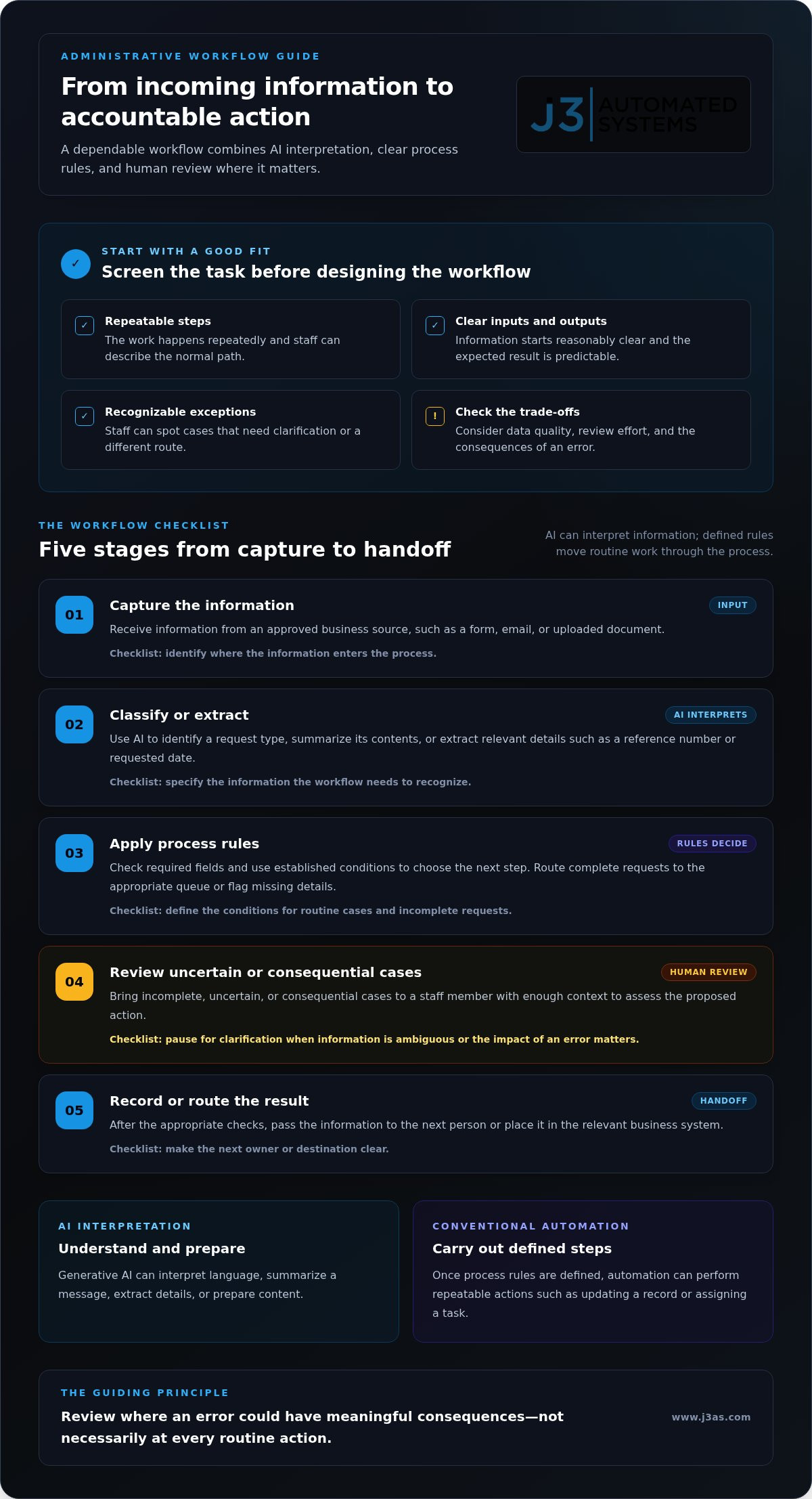
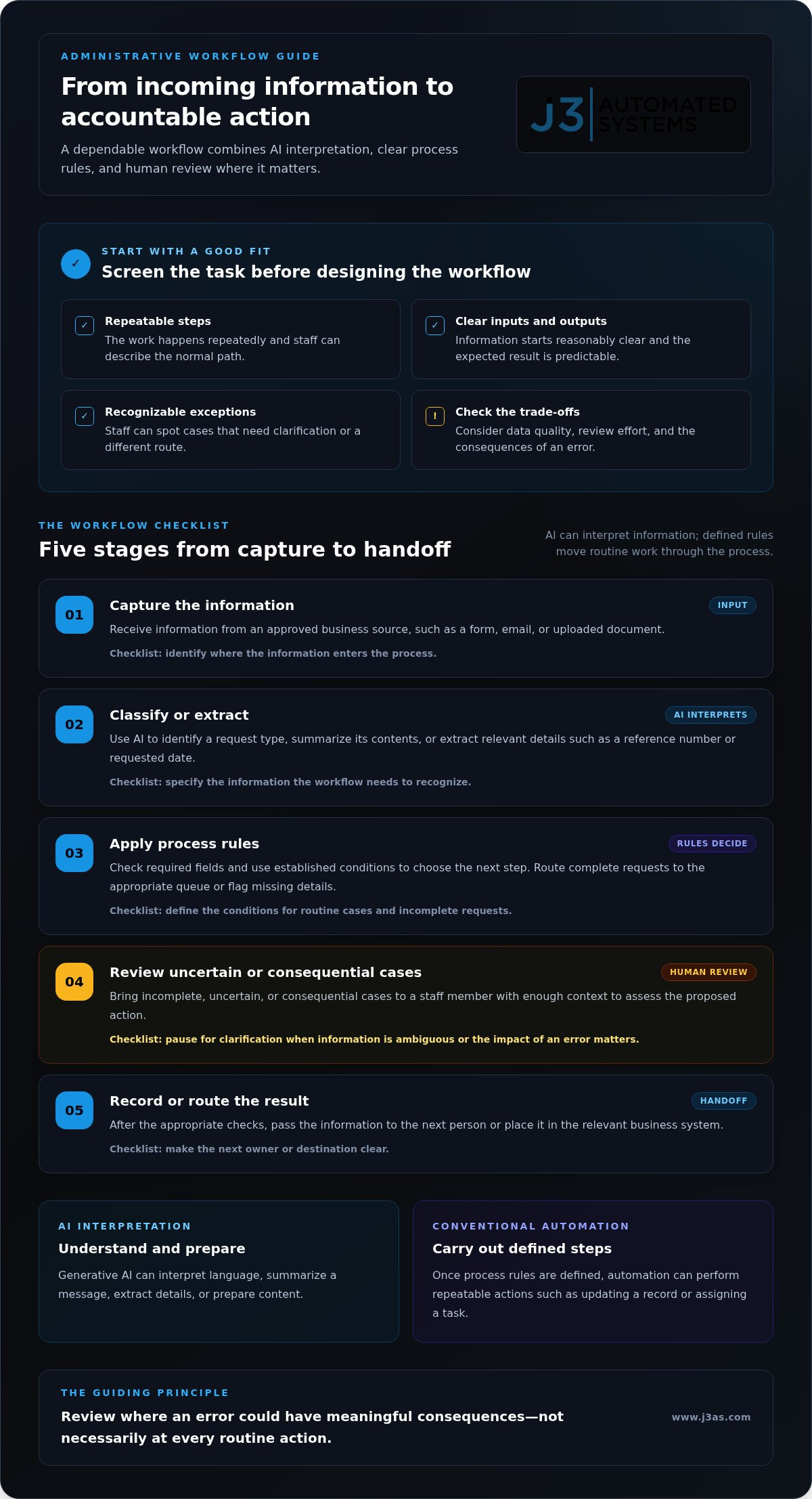
A typical information flow has five connected stages:
- Capture: Receive information from a form, email, uploaded document, or another approved business source.
- Classify or extract: Use AI to identify the request type, summarize its contents, or pull out relevant details such as a reference number or requested date.
- Apply process rules: Check required fields and use established conditions to determine the next step. Rules can direct a complete request to the appropriate queue or flag missing details.
- Review: Present uncertain, incomplete, or consequential cases to a staff member with enough context to assess the proposed action.
- Record or route: After the appropriate checks, pass the information to the next person or place it in the relevant business system.
Generative AI interprets language and prepares content; by itself, it doesn’t complete every action in a business application. Conventional automation can carry out repeatable steps once the process rules are defined. Together, these components can form a workflow, but each handoff needs to be designed and tested rather than assumed.
Human review belongs at the steps where an error could carry meaningful consequences, not necessarily at every routine action. This principle helps define where automation can proceed, where a person should approve an output, and where a case should pause for clarification.
How does AI handle documents and incoming requests?
A system may classify an incoming request, summarize its purpose, or extract fields from an attached document. Process rules can then route a complete, straightforward request to the appropriate queue. If details are missing, the request is ambiguous, or the system’s assessment falls below a defined confidence threshold, the workflow can send it to a person instead. This exception path gives staff a chance to correct or clarify information before it moves forward.
How do integrations turn assistance into a usable process?
Connected business applications and internal tools provide the handoffs between workflow stages. An AI-generated summary is only an output; the administrative action is complete only when the information reaches the right record, queue, or owner. Integrations must account for the systems and process rules involved, since applications don’t all connect in the same way. A broader view of AI business process automation helps place individual handoffs within an engineered workflow.
For processes that need a tailored connection between AI and existing systems, J3’s automation engineering brings workflow design, integration, and internal tools into one considered approach.
Is AI-Powered Administrative Automation Reliable Enough for Important Work?
AI can support important work, but reliability depends on the task, the information provided, and the controls around the output. It may misread an incomplete document, misunderstand a vague request, or produce a plausible answer that still needs correction. Treat its output as something to validate, not as proof that a process has been completed correctly. The right level of oversight depends on what could happen if an error passes through.
A useful way to set that level is to consider the consequence of a mistake and how easily a person can review and correct it. A draft that stays internal differs from an action that changes a consequential record or affects an individual. Use AI to prepare or organize information; reserve approval authority for people whenever an error could have a meaningful impact.
| Task risk | Possible AI role | Review level | Exception path |
|---|---|---|---|
| Low consequence, easy to correct | Sort routine requests or draft internal summaries | Sample checks or staff review before use | Return unclear items for manual sorting |
| Moderate consequence, details need verification | Extract fields or prepare a record update | Review key fields before saving | Hold incomplete or conflicting information |
| High impact or sensitive judgment | Organize context or prepare a draft for consideration | Human review and approval before action | Escalate to the accountable decision-maker |
Which tasks should remain human-led or human-reviewed?
Keep a person deliberately involved when a decision requires nuanced judgment, depends on context the system may not have, or carries material consequences. AI can assemble relevant information or prepare a draft, but preparation isn’t authorization. Staff need a clear way to correct inaccurate results, reject a recommendation, or escalate a case. Define who owns that decision and where the process pauses until they act.
For lower-risk tasks, review can be proportionate rather than constant. A team might review a draft before it leaves the organization, while routing a clearly labeled internal request under established rules. The control should match the consequence, not simply the presence of AI.
How can teams contain errors and protect information?
Before relying on outputs in a live workflow, test with representative examples, including incomplete, unusual, and conflicting inputs. Compare results with what staff would expect, record recurring errors, and refine the instructions or process rules. Establish what happens when the system can’t complete a step: pause, preserve the relevant information, and direct the case to an identified person rather than allowing uncertainty to pass silently onward.
Privacy and security belong in the workflow design. Decide what information the system needs, which roles can access it, what activity should be recorded for later review, and how exceptions are handled. These decisions depend on the process and information involved. For ai powered administrative automation, accountable ownership and visible review paths matter as much as the model’s output.
How to Prepare an Administrative Workflow for AI Automation
Successful implementation starts with the work as it is, not with an imagined ideal process. Before introducing ai powered administrative automation, map how a task moves today, where it slows down, and who is accountable for its outcome. That groundwork helps shape a system around actual business practices instead of forcing staff into a generic pattern.
Use this sequence to prepare a workflow:
- Select one bounded workflow. Choose a process with a clear purpose and enough repetition to examine, rather than attempting to automate an entire department at once.
- Document the current steps. Record what starts the process, who handles each stage, which systems are used, and what completion looks like.
- Map the handoffs and exceptions. Note the inputs, decision points, system transitions, missing information, unusual cases, and the person responsible for resolving them.
- Define automation boundaries. Specify what AI may prepare or classify, which actions follow fixed rules, where a person reviews work, and when the process must pause.
- Establish a baseline. Track relevant measures, such as handling time, rework, backlog, or completion quality, using a consistent method before implementation.
- Test, learn, and refine. Run the workflow against realistic cases, capture staff feedback, and adjust instructions, integrations, or review steps before extending its scope.
Keep the process owner involved throughout. They can clarify which steps are essential, distinguish a true exception from a local workaround, and ensure the new design has an accountable destination when automation cannot proceed. The workflow map should reflect how information actually travels across people and systems, including informal transitions that are necessary to finish the work.
How should a team define success before implementation?
Choose measures that reflect the burden the team wants to address. If repeated corrections create friction, track rework; if requests wait in a queue, monitor backlog and completion quality. Record the same measures in the same way before and during testing. Also define acceptable output quality, which cases need staff review, and what errors or unusual inputs should pause the workflow. These criteria make evaluation grounded rather than impressionistic.
How can a rollout reduce disruption?
Begin with a controlled test of one bounded workflow, using realistic cases that include both ordinary requests and exceptions. Ask the people who perform or supervise the work where outputs are useful, where handoffs feel awkward, and what could be missed. Refine the process before expanding it. A measured rollout gives the team room to improve the design without assuming the first version fits every case.
For a process that needs tailored workflow mapping, internal tools, or connections between existing systems, explore custom AI workflow integration with J3 Automated Systems.
How J3 Engineers AI-Powered Administrative Automation Around Your Business
Administrative automation works best when it reflects the business behind it. J3 Automated Systems approaches AI integration as an engineering and process-design challenge: understand how work moves, then determine where tailored software, internal tools, and AI can support it. This keeps the solution anchored to a real operating need rather than asking staff to reshape their work around a universal platform.
That approach brings the process and its supporting systems into the same design conversation. A workflow may depend on information moving between existing applications, staff review, and internal records. J3 maps those relationships and develops an automation roadmap that accounts for the handoffs, decision points, and exceptions shaping day-to-day work. AI is integrated where it fits the process, with the role of people kept clear.
What does a tailored automation engagement address?
Discovery begins with the administrative process itself: its steps, staff needs, existing systems, and meaningful constraints. From there, engineering connects workflow design to the right implementation, which may include custom software, internal tools, system integration, and AI. Bespoke applications can give a process a more useful interface or connect tasks that don’t fit neatly into existing software. For a closer look at this role, explore custom web app development in San Antonio.
Keeping these decisions connected helps avoid a common mismatch: an AI capability produces a useful result, but staff still have to move it manually through the rest of the process. Instead, the design considers where information originates, who needs it next, and how the work is recorded. The objective is a process-specific system that supports how the business operates, not a platform imposed as a substitute for understanding the workflow.
J3 carries the work through discovery, workflow mapping, development, integration, implementation, and support as one accountable engineering effort. That continuity connects initial requirements to the tools and system connections built to support them. J3 serves businesses in San Antonio, New Braunfels, Seguin, Bandera, Boerne, Austin, and San Marcos, shaping automation roadmaps around each organization’s actual operations rather than assumptions about a generic office workflow.
What is a useful next step for a Texas business?
Start with one repetitive administrative workflow and describe where it creates friction: duplicated entry, stalled handoffs, avoidable follow-up, or unclear ownership. Bring the current process, its supporting systems, and the points that require staff judgment into the conversation. These details help define what automation should handle, where oversight belongs, and what a practical first step could look like.
If you’re ready to explore a process-specific approach, discuss an AI automation roadmap with J3.
Make Your Next Workflow a Deliberate Step Forward
The next move doesn’t need to be a sweeping transformation. Choose one administrative process where repeated handling is pulling attention away from more valuable work, then decide what a better experience should look like for the people who rely on it. That clear starting point gives ai powered administrative automation a practical purpose: support a process your team understands, with room to refine the design as you learn.
J3 brings discovery, engineering, implementation, and support together through one accountable team, connecting custom software, internal tools, and AI integration to business needs. The focus is a thoughtful path from the current workflow to a system designed around how your organization operates.
Identify the process you’d most like to improve, then start planning your AI automation roadmap with J3.
Frequently Asked Questions
Can AI automate administrative tasks without replacing staff?
Yes. AI can handle defined administrative steps without implying that a role should disappear. For example, it might prepare a first draft of a recurring internal update, while an employee checks the tone, context, and any commitments before sending. A team can then focus more attention on customer coordination or resolving unusual cases. The decision is about how to allocate tasks, not an automatic conclusion about staffing.
Is AI-powered administrative automation suitable for a small business?
Yes, it can suit a small business when a recurring process takes meaningful staff attention and has a clear purpose. A San Antonio business, for example, might examine how it handles routine service requests before considering a larger system. The owner should also account for existing software, sensitive information, exceptions, and ongoing maintenance. A manageable workflow and realistic test plan matter more than having a large technology department.
What happens if AI makes a mistake in an administrative workflow?
The response should match the mistake’s impact. If AI drafts an internal note incorrectly, an employee can edit it before use; if it prepares an update to an important record, the workflow can hold the change for approval. Teams should decide who receives an error, how to correct affected information, and how to prevent the same failure from passing unnoticed in later cases.
Can AI administrative automation work with software a business already uses?
Often, but the answer depends on the software’s connection options and the specific workflow. A process may use an internal tool to collect information, then pass approved details to another application. Before designing that handoff, identify which system owns the official record and which actions need a person’s approval. This prevents duplicate or conflicting records and helps clarify what an integration must accomplish.
How much human review does AI administrative automation need?
Review should reflect the task’s risk and how easily its result can be checked. A staff member might sample routine internal summaries, while a customer-facing message or a change to a significant record may need approval before release. Track the types of corrections reviewers make, not only whether an output passed. That evidence can help adjust review rules as the workflow and team’s experience develop.
Does AI-powered administrative automation require clean, structured data?
No, but inconsistent information can make a workflow harder to manage. Requests may arrive in different formats or omit details needed for processing. Before implementation, examine real examples and identify which fields are essential, which can be inferred, and which must be clarified by a person. This assessment helps determine whether to improve data collection, add a review step, or route incomplete cases for follow-up.