Business Automation in Austin: A Practical Guide to Connected Operations

What if your next automation project connected the systems you already rely on instead of adding another one? The value of business automation austin companies seek is not simply fewer manual tasks. It is a coordinated operation where business software, AI, and building systems work together instead of remaining isolated in separate silos.
That distinction matters when staff lose time to repetitive administration, data sits in disconnected tools, or a project’s scope and value feel uncertain. Start by identifying a recurring bottleneck, then trace how information and work move through the business. From there, automation can be designed around the actual workflow, whether it involves a custom internal tool, AI integration, or commercial building systems such as HVAC and BMS.
This guide explains how to assess opportunities, coordinate physical and digital operations, and plan an implementation around your business needs. It also outlines how discovery, system design, development or installation, integration, and commissioning fit together. J3 Automated Systems serves businesses in Austin and across Texas, including San Antonio, New Braunfels, Seguin, Bandera, Boerne, and San Marcos.
Key Takeaways
- Map task frequency, handoffs, exceptions, owners, and information sources to reveal where automation could reduce friction.
- Compare workflow software, custom applications, AI integration, and building systems by use case, dependencies, and affected teams.
- Use a phased project plan to clarify requirements, integration points, testing, and handover before implementation expands.
- Approach business automation austin as a connected operational design, not a collection of unrelated technology purchases.
- See how one accountable engineering team can coordinate discovery, implementation, and commissioning across digital and physical systems.
What business automation in Austin can address across operations
Business automation connects processes, software, data, and relevant physical systems so routine work and operational responses require less manual coordination.
That can mean routing an approval, transferring information between business tools, using AI to support a defined process, or coordinating facility controls. Each approach addresses a different need: workflow automation follows rules, AI integration can assist with tasks involving language or pattern recognition, and building automation manages systems such as HVAC or lighting. A practical Business Process Automation overview offers further context on methods including robotic process automation and intelligent automation.
For businesses researching business automation austin, useful signals are often operational rather than technical: the same information is entered repeatedly, staff pass work manually between teams, records are scattered across tools, or facility adjustments create avoidable friction. Limited visibility into a task’s status or a building system’s operation can also make consistent responses harder. Automation is most useful when it addresses a defined source of friction, not simply because a new technology is available.
Which business processes are good candidates for automation?
Start with recurring administrative work, approvals, reporting, and information transfer between tools. For example, if an approval requires repeated reminders and manual status updates, a designed workflow can route the request and make its progress visible. Stable, well-understood processes are easier to assess than work that changes substantially from case to case. Keep a responsible person attached to each decision and exception. Automation should support staff and clarify ownership, not obscure accountability.
How physical-system automation differs from workflow automation
Commercial HVAC and lighting controls coordinate facility operations. Workflow automation, by contrast, moves information or tasks through business processes, often using custom applications or internal tools. An AI integration may support a digital workflow, but it still needs a defined purpose, appropriate data, and human oversight.
These systems can be considered together without forcing every tool or building system to connect. Start with the operational need, then identify which systems must exchange information and which should remain independent. For example, a facility control project may stand on its own while a separate internal application addresses an administrative handoff. The aim is a coherent operational plan, with deliberate connections where they add value and clear boundaries where they do not.
How Austin businesses can map automation opportunities before choosing technology
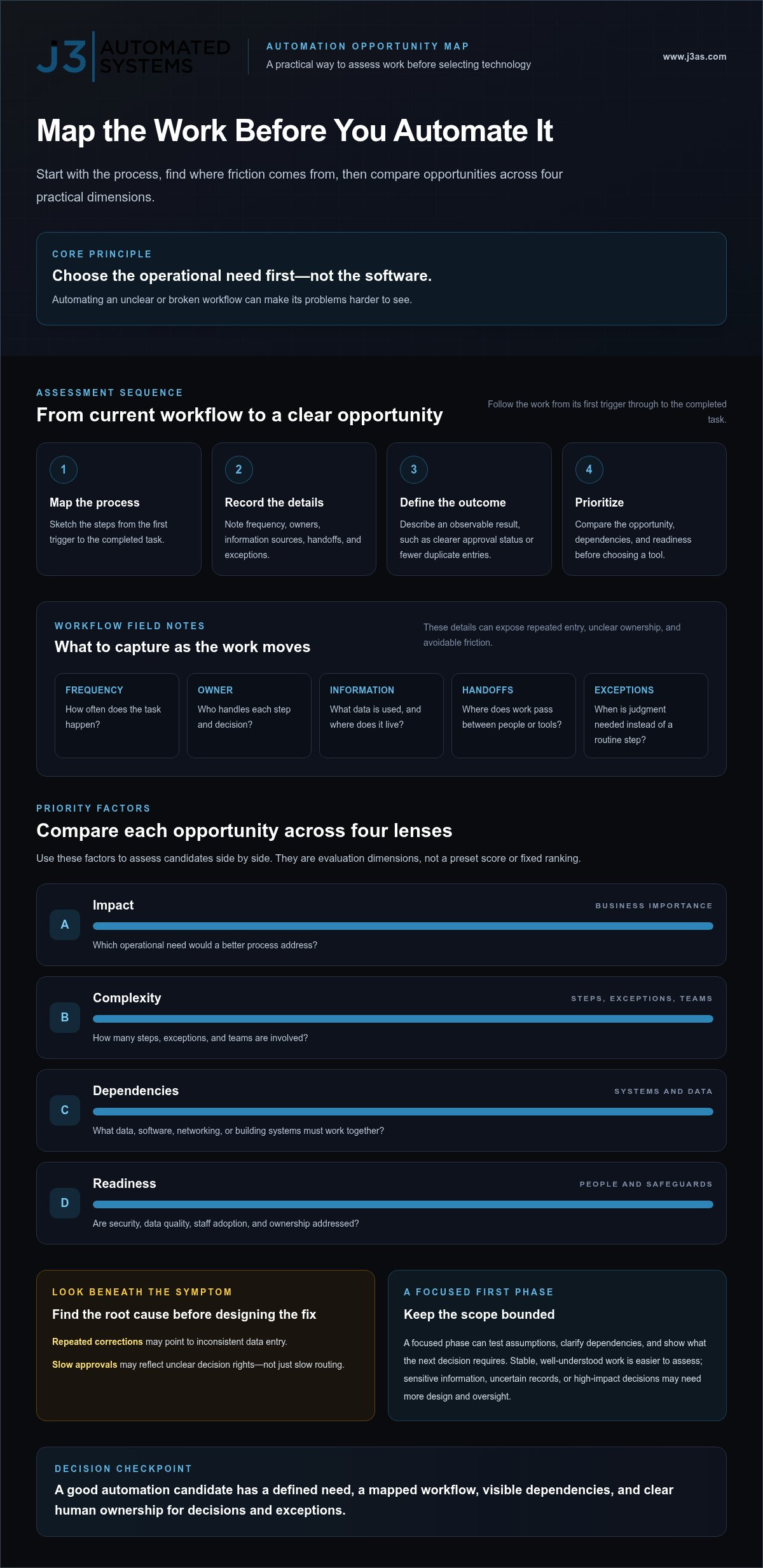
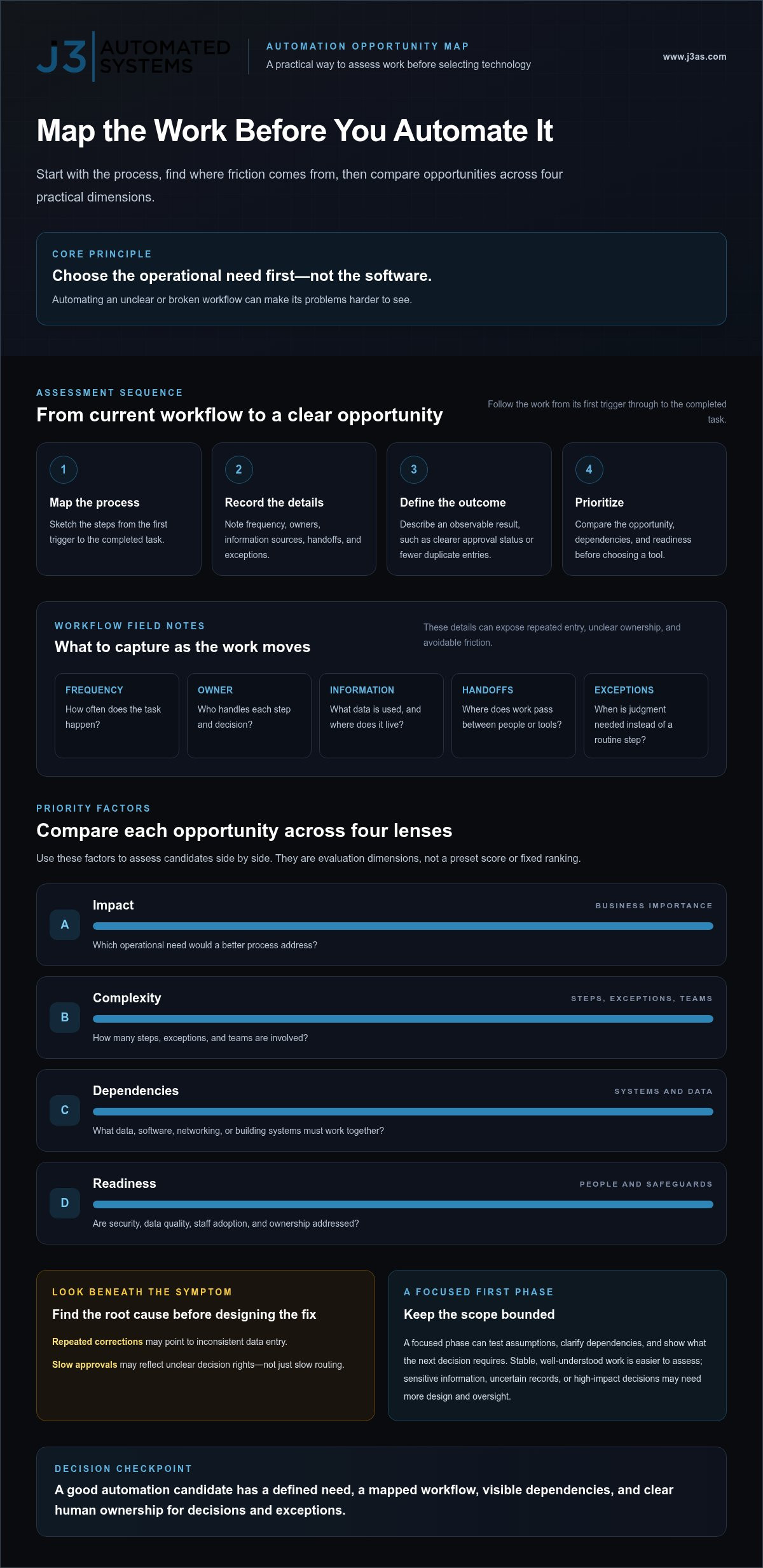
Begin with the work, not the software. A clear assessment maps the process, locates friction, defines the intended outcome, assesses dependencies, and prioritizes the opportunity. This sequence helps distinguish a technology problem from an unclear procedure, missing information, or an ownership gap.
Map the process before selecting a tool. Otherwise, you risk automating a broken workflow and making its problems harder to see.
Map the workflow and define a useful outcome
Sketch the current process from the first trigger to the completed task. For each step, record how often it happens, who handles it, what information they use, where work is handed off, and which exceptions require judgment. A request that moves through email, a spreadsheet, and a separate record system, for instance, may reveal duplicated entry or unclear approval ownership.
Then define the intended result in observable terms, such as fewer duplicate entries, clearer approval status, or a more consistent report. These objectives guide design without assuming a particular tool or promising a fixed productivity gain. For more context on workflow design and AI integration, read this AI business process automation guide. This additional workflow-planning reference can also prompt you to examine connections and dependencies.
Look beneath symptoms before automating. Repeated corrections may point to inconsistent data entry; slow approvals may reflect unclear decision rights rather than a need for faster routing. Documenting exceptions and talking with the people who perform the work can help identify the root cause.
Prioritize opportunities by impact, complexity, and dependencies
Compare candidate workflows by business importance, process stability, integration needs, and the consequences of an error. A frequent, stable task with clear ownership may be a sensible first phase. A process involving sensitive information, uncertain records, or high-impact decisions may require more design and oversight before automation.
- Impact: Which operational need would a better process address?
- Complexity: How many steps, exceptions, and teams are involved?
- Dependencies: What data, software, networking, or building systems must work together?
- Readiness: Are security, data quality, staff adoption, and ownership addressed?
A focused first phase gives the team a bounded scope to test assumptions, clarify dependencies, and determine what the next decision requires. For business automation austin projects, this disciplined discovery keeps the roadmap grounded in actual operations. Explore tailored automation engineering from J3 Automated Systems for workflows involving connected software, AI, or building systems.
Compare software, AI, and building automation for Austin operations
Choose an approach that fits the mapped need, not the one with the broadest promise. A repeatable handoff, a specialized internal workflow, a task involving unstructured information, and a facility control challenge call for different designs. AI is one automation method, not a complete operational strategy. It still depends on clear processes, suitable data, and accountable human oversight. To better assess your organization's reporting foundations and operational metrics, discover Quantum-Num for data analysis consulting.
| Approach | Suitable use cases | Dependencies | Implementation considerations and teams affected |
|---|---|---|---|
| Workflow software | Routing routine requests, approvals, or notifications | Defined steps, roles, and information sources | Clarify exceptions and ownership; affects staff who submit, review, or track work. |
| Custom applications | Internal workflows or records that need a tailored interface | Stable requirements, reliable data, and connections to relevant systems | Shape the application around the process; involve its users and operational owners. |
| AI integration | Supporting workflows that involve language, classification, or other judgment-intensive inputs | Appropriate data, defined boundaries, and human review | Set oversight and exception paths; affects the teams responsible for decisions and outcomes. |
| Building systems | Commercial HVAC, lighting, security, AV, or networking needs | Facility requirements and the relevant control and network environment | Plan installation, integration, and commissioning; involve facilities and building operations teams. |
When custom software or AI integration fits a business process
Repeated administrative work and disconnected tools can point to a need for a tailored internal application or an integration between existing systems. AI may help with specific steps, but discovery should first establish the workflow, information used, exceptions, and decisions that remain with staff. For a closer look at bespoke tools, see custom web app development.
When building automation belongs in the same operational plan
Facility requirements differ from employee-facing software workflows. HVAC and lighting controls respond to building needs, while security, AV, and networking serve distinct operational functions. Bring them into the same plan when shared requirements or dependencies make coordination useful, not simply because every system can be connected. For more on BMS design, explore commercial building management systems in Texas.
A connected approach to business automation austin projects starts by matching each system to its purpose, then engineering only the integrations that support that purpose.
Plan a business automation project in Austin without adding unnecessary complexity
A well-scoped project follows a deliberate sequence: discovery, requirements, system architecture, implementation, integration, testing, and handover. Each stage resolves questions that could otherwise surface during deployment, from who owns a process to how a new application should interact with existing building systems.
For business automation austin projects, phased scope can help limit avoidable disruption. Establish what the first phase must accomplish, document the systems it depends on, and involve the people who use or maintain those systems. A focused scope gives the team a clear boundary for design and testing while preserving a reasoned path for future work.
What discovery and system design should establish
Discovery brings the operational picture into focus. It maps existing tools, workflows, facility systems, users, constraints, and desired outcomes, including where processes cross between digital and physical environments. Requirements then turn those findings into a technical scope: what the system must do, what information it needs, which connections matter, and how success will be evaluated.
J3 Automated Systems brings physical and digital requirements into one coordinated roadmap. For an Austin business, that can mean considering custom software or AI integration alongside relevant commercial building systems, without assuming every component needs to connect. The architecture should make necessary relationships explicit and keep the project aligned with operational priorities.
How implementation, integration, and commissioning fit together
Implementation puts the approved design into practice through system installation or software development and configuration. Integration establishes the planned connections; testing checks individual functions and the points where systems exchange information. Involving stakeholders throughout these stages helps surface practical issues before handover.
Commissioning verifies that the designed systems operate together as intended. It closes the gap between a completed installation or development effort and a usable operational result. A considered handover gives staff clear documentation, explains relevant workflows and system functions, and identifies ownership for routine use and support. These steps help teams understand how the solution is meant to work after implementation.
J3 serves commercial clients throughout Texas, including Austin, with design, implementation, integration, and commissioning across physical systems, custom software, and AI. Plan a connected automation project with one accountable engineering team.
Bring Austin business automation together with one accountable engineering team
A connected operation does not require every system to be joined to every other system. It requires a clear view of the business need, the systems involved, and the connections that will make work more coherent. For Austin organizations, that may mean addressing a digital workflow, a facility requirement, or dependencies that span both.
J3 Automated Systems brings commercial building automation, custom web applications and internal tools, and AI business process integration into a coordinated engineering approach. One accountable team can carry a tailored roadmap from discovery and system design through implementation and commissioning. That continuity helps keep operational requirements visible as physical systems are installed and digital tools are developed.
What an integrated automation roadmap can bring together
A roadmap begins with the workflow and property, not a predetermined product. It can consider commercial HVAC and building management systems, security, AV, resilient networking, custom applications, and AI integration where each addresses a defined need. The plan identifies relevant dependencies and leaves unrelated systems independent. Its scope is tailored to the organization’s workflows, existing environment, and desired outcomes.
Take the next step on an Austin-area automation project
Prepare a short outline of recurring tasks, facility needs, existing systems, and the outcomes you want to improve. You do not need a finished technical specification. Discovery helps clarify the operational challenge, identify relevant constraints, and shape an appropriate scope before implementation begins.
Whether your priorities involve staff workflows, building operations, or both, frame the conversation around what needs to work better rather than a specific technology. That gives the engineering team a useful starting point for a practical roadmap. J3 serves commercial clients in Austin and throughout Texas with coordinated design, implementation, and commissioning.
Discuss a tailored business automation roadmap
Turn operational friction into a connected plan
Effective automation starts with a clear operational need, not a predetermined technology. Map the work, identify points of friction, and define the outcome before selecting an approach. Workflow software, custom internal tools, AI integration, and building systems each serve different purposes, and they should connect only where the operation benefits.
For business automation austin, J3 Automated Systems brings commercial building automation, custom tools, and AI workflow integration into one tailored engineering approach. One accountable team can guide discovery, engineering, installation or development, and commissioning for businesses in Austin and other Texas communities, including San Antonio, New Braunfels, Seguin, Bandera, Boerne, and San Marcos.
Bring a short outline of the recurring tasks, facility needs, and systems you want to improve. Discovery can shape those details into a practical roadmap for your operation. Discuss a tailored business automation roadmap and take a considered first step toward more connected operations.
Frequently Asked Questions
What is business automation, and what can it include?
Business automation connects processes, software, data, and relevant physical systems to reduce manual coordination and support consistent operations. Digital workflow automation can route an approval or transfer information between tools. AI integration can assist with defined tasks involving language or patterns, with people retaining appropriate oversight. Building automation manages facility systems such as commercial HVAC and lighting controls. A project may address one area or coordinate several when their connection serves a clear operational purpose.
How can automation help a small business in Austin?
Automation can help an Austin small business structure recurring administrative tasks, route approvals, organize information across tools, or manage relevant building systems. A focused workflow might reduce repeated manual data entry or make a request’s status easier to follow, without guaranteeing a particular savings or result. Businesses exploring business automation austin can start by identifying a recurring point of friction, then assess whether workflow software, a custom tool, AI integration, or building controls fit the need.
Can AI automate repetitive administrative work?
Yes. AI can support selected repetitive administrative tasks when the process, information, and limits are clearly defined. It may assist with organizing incoming requests, classifying information, or preparing material for staff review. Not every step should be automated: exceptions, sensitive decisions, and final accountability may require human judgment. A sound implementation maps the workflow first, establishes how staff review outputs, and defines how errors or unusual cases are handled.
How do I know which business process to automate first?
Choose a process by mapping how often it occurs, where friction appears, what exceptions arise, which systems it depends on, and how important it is to the business. Record handoffs, responsible roles, and information sources as well. A frequent, stable workflow with clear ownership may be easier to assess than work that changes from case to case. Investigate root causes before selecting technology, so automation reinforces a sound process rather than encoding a broken one.
What is the difference between business process automation and building automation?
Business process automation structures digital work, such as routing an approval or moving information between applications. Building automation manages facility systems, including commercial HVAC and lighting controls. The two address different operational environments and involve different users, requirements, and dependencies. They may connect when a defined business need calls for it, but integration is not automatic or necessary in every project. The design should reflect the actual workflow and property requirements.
How long does a business automation project take?
Project timing depends on the scope and complexity of the work, the systems involved, integration requirements, and whether implementation includes software development, physical installation, or both. A narrowly defined workflow differs from a project spanning custom tools and building systems. Discovery helps clarify dependencies and implementation needs before a schedule is established. Define the desired outcome, technical scope, testing, and handover requirements with the project team rather than assuming a standard duration.
How do Austin businesses plan a business automation project?
Austin businesses can begin with discovery to map workflows, existing software, facility systems, users, constraints, and goals. The team then defines requirements and system architecture, followed by implementation, integration, testing, and commissioning. Include relevant staff in planning and document dependencies so the design reflects actual operations. J3 Automated Systems serves commercial clients in Austin and other Texas communities with coordinated engineering across physical systems, custom tools, and AI integration.