Smart Office Solutions in Austin: A Commercial Buyer’s Guide

What if your office technology worked as one coordinated system instead of a collection of separate tools? For businesses exploring smart office solutions Austin, that distinction matters: disconnected building controls, networks, and workplace software can add friction rather than remove it. The goal isn’t simply to add more technology. It’s to connect the systems that support how your property and team operate.
Choosing an integrated approach can feel complex when building automation, connectivity, and digital workflows seem like separate purchasing decisions. Start by identifying the workplace problems you want to address, then map the relevant systems and responsibilities. This guide explains how HVAC and building management, resilient networking, custom software, and AI integration can contribute to a more coherent workplace, and what to consider when planning them together.
You’ll also learn what to include in project scope, engineering, installation, commissioning, and ongoing support. With a clear view of the full lifecycle, you can compare coordinated design with disconnected purchases and plan a professionally engineered project around the way your office needs to function.
Key Takeaways
- Identify workplace priorities first, then map technology choices to occupant experience, facilities needs, and business operations.
- Learn how smart office solutions Austin can be planned around a property’s existing systems and operating requirements.
- Compare integrated projects with separate purchases to understand differences in coordination, ownership, and future adaptation.
- Follow the project path from discovery and engineering through installation, commissioning, and ongoing support.
- See how a coordinated delivery team can bring building automation, AV, lighting, security, and networking into a considered plan.
What Smart Office Solutions in Austin Actually Include
A smart office is a workplace where connected technologies are planned to support building operations and occupant experience as a coordinated system. The defining feature is integration: systems are selected and configured around the property’s needs, rather than added as unrelated devices.
That’s different from buying office equipment, adopting standalone business software, or installing a smart device that operates on its own. A copier serves a specific equipment need; a scheduling app supports a digital workflow. Neither, by itself, coordinates a building’s operations. Building Automation Systems provide a foundation for managing functions such as HVAC and lighting. A broader office plan may also include AV, security, and networking.
Which office systems can work together?
Commercial building automation can coordinate HVAC and other building functions through a building management system. Lighting and automated shades can be planned around how rooms are used throughout the day. AV supports presentations and collaboration, while security and resilient networking contribute to a dependable, usable workplace.
These systems don’t need to be bundled into one identical package. The right mix depends on the property, existing infrastructure, occupant needs, and operating priorities. For one workplace, visibility into HVAC and building functions may be central. For another, meeting-room AV or lighting control may deserve more attention. Integration planning clarifies how selected systems relate and where separate functions should remain distinct. For property managers also evaluating exterior automation, Aquamax Sprinkler Systems offers practical insight into deploying smart controllers to improve outdoor efficiency.
Why Austin businesses consider integrated office technology
For commercial properties in Austin, start with how the workplace operates, not with a trend or a device list. Consider comfort in different areas, how easily facilities staff can view building functions, and whether routine adjustments involve avoidable steps. A connected design can align the physical environment with the routines of the people who use and manage it.
These are evaluation goals, not guaranteed results. System performance depends on its design, property conditions, and how it is commissioned and operated. Assess smart office solutions Austin businesses are considering as an engineered scope: make the intended functions and relationships between systems clear before implementation. The aim is a more coherent workplace, not technology for its own sake.
How to Choose Smart Office Solutions for an Austin Workplace
Choose technology by working from the way your workplace operates, not by starting with a catalogue of devices. A practical selection process connects occupant comfort, facilities responsibilities, and business workflows to a clearly defined project scope. For smart office solutions Austin businesses can rely on, identify what needs to work together and how the finished system will be used and supported.
Start with the workplace and its operating priorities
Map recurring needs before selecting systems. Note where temperature or lighting adjustments create friction, how meeting rooms are used, which access and security functions matter, and what facilities staff need to monitor or manage. Include both daily users and the people responsible for operating the technology. Separate essential requirements from improvements that could be considered in a later phase.
Evaluate integration, usability, and project accountability
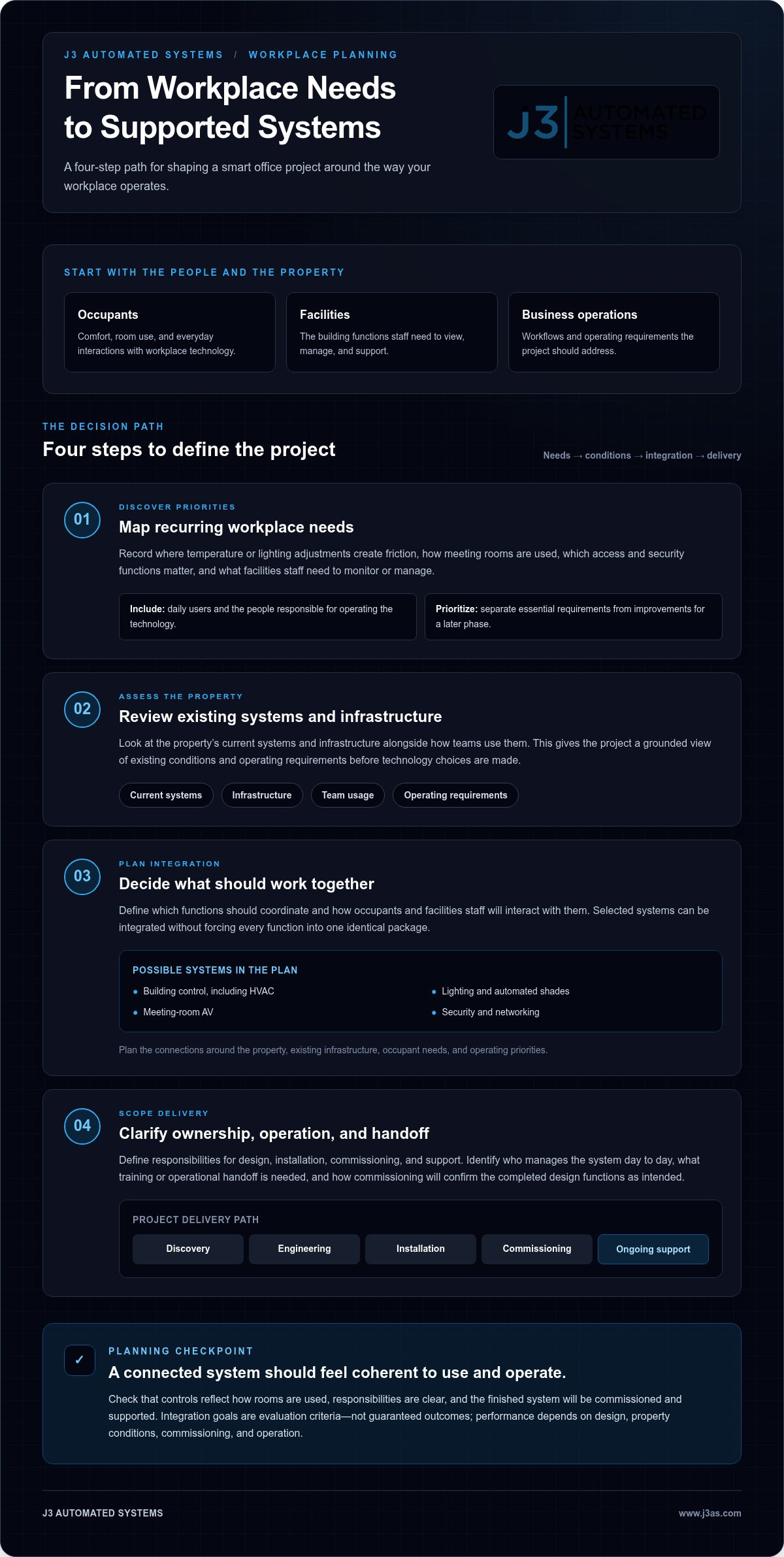
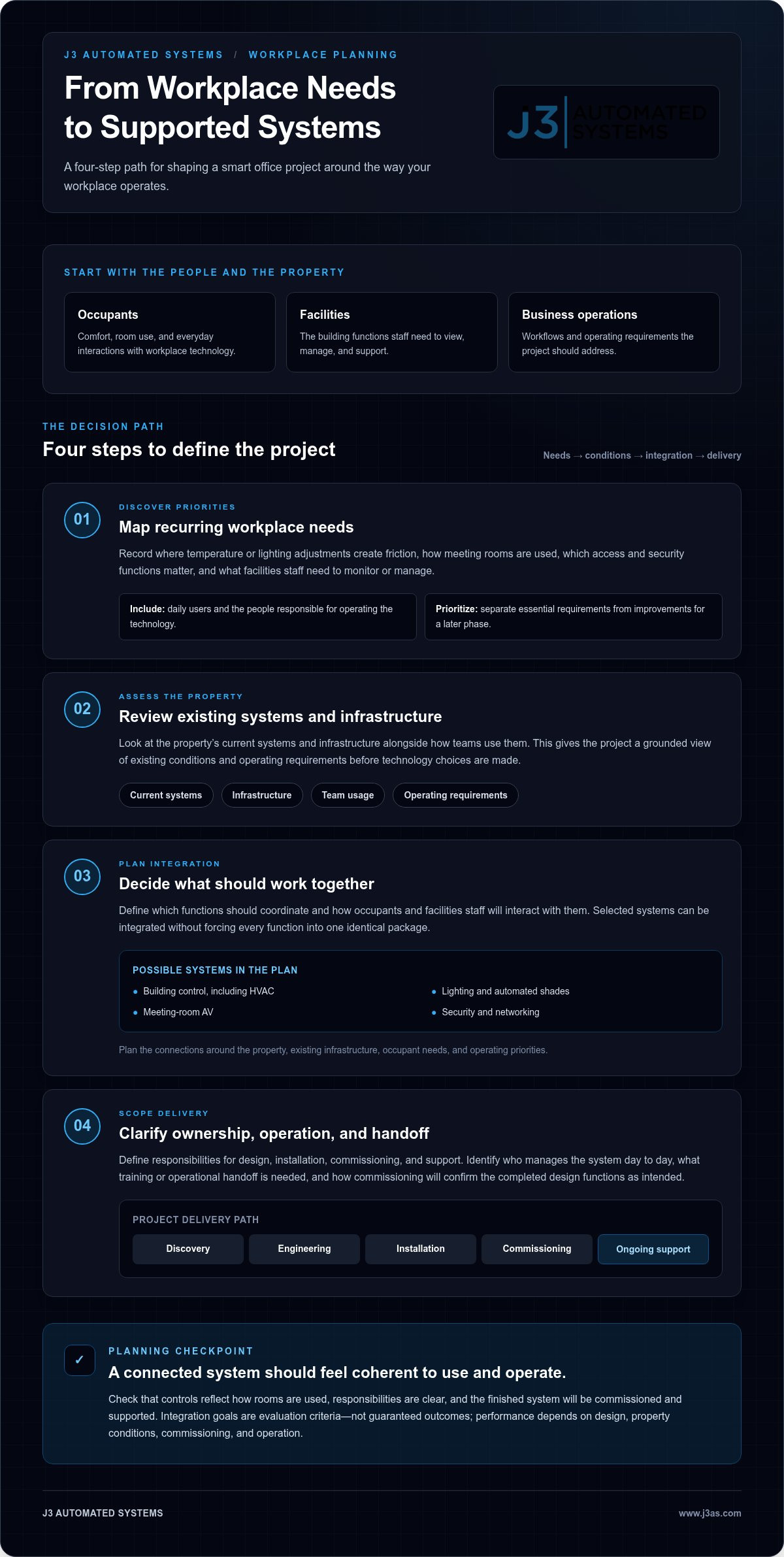
Use these four steps to shape the decision:
- Define needs: Record the operational issue each system should address, from building control to room AV.
- Assess existing conditions: Review the property’s current systems and infrastructure, along with how teams use them.
- Plan integration: Establish which functions should coordinate and how occupants and facilities staff will interact with them. The Association for Smarter Homes & Buildings offers broader context on connected building technologies and their role in the built environment.
- Scope delivery: Clarify design, installation, commissioning, and support responsibilities so the project has a defined path from planning through operation.
Integration matters at the point of use. If staff must switch between controls that behave differently or don’t reflect how rooms are used, connected technology can still feel fragmented. Assess usability alongside long-term operation: who manages the system day to day, what training or operational handoff is needed, and how commissioning will confirm that the completed design functions as intended. A single accountable team across engineering, installation, commissioning, and support can help keep those responsibilities aligned.
For a closer look at building-system planning, explore commercial building management systems in Texas. J3’s commercial automation approach brings discovery, engineering, installation, commissioning, and support into a coordinated process. Explore J3’s commercial automation approach to see how the process can be shaped around your workplace.
Integrated Systems vs. Separate Office Technology Purchases
Buying capable technologies separately can address immediate needs, but it can leave important questions unanswered: how will the systems coordinate, who will resolve issues between them, and who owns the overall operating experience? An integrated project addresses those relationships during planning. The difference isn’t the number of technologies installed; it’s whether their roles, interactions, and responsibilities are deliberately designed.
| Consideration | Coordinated project | Separate purchases |
|---|---|---|
| Coordination | System relationships and requirements are planned together. | Each purchase may meet its own specifications without addressing connections to other systems. |
| User experience | Controls and workflows can be considered as part of the intended day-to-day experience. | Users may encounter separate interfaces and operating steps. |
| Project ownership | Responsibilities across design, installation, and commissioning can be scoped as a whole. | Ownership may be divided, leaving coordination between suppliers or systems unresolved. |
| Future adaptation | Planning can account for known priorities and possible later phases. | Changes may require revisiting how individual systems fit together. |
What changes when building systems are designed together?
Shared discovery gives the project team a common view of the property, existing systems, and intended operating experience. Engineering can then coordinate building automation with relevant AV, lighting, security, and network requirements while keeping each system’s responsibilities clear. This doesn’t mean every technology will automatically connect to every other one. Integration depends on project conditions and must be defined for the systems in scope.
Commissioning provides an opportunity to tune installed systems and validate their intended operation. It moves the project beyond installation toward a coherent, usable result, with handoff and support included in the delivery plan rather than left as separate questions.
Where software and AI fit into a smart office
Physical building automation manages building functions such as HVAC and lighting. Custom internal applications and AI business process integration address a different layer: how people handle information, approvals, or recurring business tasks. A digital workflow may complement a building system by simplifying a related process, but it doesn’t replace the property’s underlying controls. For examples of workflow-focused applications, explore AI business process automation.
For buyers assessing smart office solutions Austin, the practical takeaway is that multiple technologies do not automatically make an integrated system. Integration means considering requirements, user experience, project ownership, and commissioning together, with connections defined around the property rather than assumed.
Planning a Smart Office Project in Austin from Discovery to Commissioning
A well-defined project moves from operational goals to an engineered plan, then into installation, commissioning, and support. Each stage has a purpose: discovery establishes what the workplace needs, engineering shapes the system, installation brings it into the property, and commissioning checks its intended operation. The scope and sequence depend on the building and systems involved, rather than following a fixed template.
What happens during discovery and engineering?
Discovery brings together the people who use and manage the workplace, its operating priorities, and the existing systems. A project might address HVAC and building management alongside meeting-room AV, lighting, security, or networking. The aim is to understand how these elements fit the site and where coordination matters, rather than assume every project needs the same technology.
Engineering turns that understanding into a defined scope. It clarifies which systems are included, how the design responds to property conditions, and what installation decisions are needed. That clarity helps align equipment and implementation with the project’s intended function. It also gives the team a basis for coordinating work across systems without assuming every component will connect in the same way.
Why installation and commissioning belong in the plan
Installation translates the engineered design into the physical environment. Depending on scope, that may involve building automation, AV, lighting, security, and networking, with coordination where their work intersects. For security, a considered design connects protection requirements to the property’s layout and broader system plan. See more about commercial security system design in Texas.
Commissioning is more than a final formality. It provides a structured opportunity to tune installed systems, test them against their intended operation, and address issues before the project moves into ongoing use. Support carries the design forward after handoff. Bringing discovery, engineering, installation, commissioning, and support into one coordinated project can clarify ownership from the outset.
For smart office solutions Austin businesses are planning, property conditions and a carefully scoped design should guide implementation, not an assumed timeline or one-size-fits-all package. J3 develops tailored automation projects for commercial clients in Austin around the building and its operating needs. Discuss a tailored smart office project with J3.
How J3 Delivers Tailored Smart Office Solutions in Austin
A commercial technology project works best when design, implementation, and ongoing operation are considered together. J3 Automated Systems serves commercial clients in Austin with an end-to-end process that brings discovery, engineering, hardware installation, commissioning, and support into one coordinated scope. This gives decision-makers a clear point of accountability as the project moves from operational goals to a system designed for the property.
One coordinated team across connected office systems
J3 tailors commercial projects around the building and the people who use and manage it. The scope may include HVAC and building management, AV, lighting, security, and networking, based on property conditions and client priorities. Rather than assume every system belongs in every project, the team establishes what the workplace needs and how selected systems should function within the design.
Unified project ownership helps align decisions across stages. Discovery informs engineering; engineering guides installation; and commissioning checks that the completed systems operate as intended. Support is part of the broader lifecycle, not an afterthought. This approach provides a coherent path for physical systems without assuming every technology is universally compatible or must be connected in the same way.
A practical next step for Austin decision-makers
Preparation can make an initial project discussion more focused. Gather the priorities driving the work, a summary of relevant existing systems, and any known property or operational constraints. It also helps to distinguish immediate requirements from future possibilities. These details give the project team useful context without requiring you to arrive with a finished technical specification.
J3 develops smart office solutions Austin businesses can shape around their property and priorities, rather than a fixed package. The resulting scope can define the systems involved and the path through design, installation, commissioning, and support. If you’re ready to explore a coordinated approach for your workplace, Discuss your Austin smart-office project.
Move from Disconnected Technology to a Clear Project Plan
The strongest smart office solutions Austin businesses pursue begin with operational priorities, not a predetermined device list. Define what occupants and facilities teams need, assess the property’s existing systems, and plan how selected technologies should work together. A coordinated project also clarifies ownership across design, implementation, commissioning, and ongoing support.
J3 brings discovery, engineering, installation, commissioning, and support into its commercial project delivery. Its capabilities span building automation, AV, lighting, security, networking, custom software, and AI integration, with the scope tailored to the property and business goals. This range can bring physical systems and digital processes into a carefully considered plan.
If your workplace is ready for a more coherent approach, begin with the priorities you want the project to address and the systems already in place. Discuss your Austin smart-office project with J3 to take the next step toward a professionally engineered solution. A clear plan can make complexity easier to manage and help your technology serve the way your business works.
Frequently Asked Questions
What are smart office solutions?
Smart office solutions connect workplace technologies to support building operations and the people using the space. Depending on the property, they may include HVAC or building automation, lighting, AV, security, and networking. The defining feature is coordination: systems are planned around operational needs and their intended use, rather than treated as unrelated devices. Standalone software or office equipment may serve a purpose, but it doesn’t by itself make a workplace integrated.
What should an Austin smart office include?
Smart office solutions Austin businesses choose should reflect the property, its existing systems, and the priorities of occupants and facilities teams. There’s no universal checklist. One workplace may prioritize building automation and lighting; another may need AV, security, or resilient networking. Identify the operational challenges the project should address, then shape the scope around those needs instead of assuming every office requires every technology category.
How do I choose a smart office solution for my business?
Start by documenting workplace and facilities priorities, then identify which systems are involved and how they should function together. Consider usability, existing infrastructure, project ownership, and long-term support alongside the technology itself. A well-defined roadmap accounts for discovery, engineering, installation, commissioning, and ongoing operation. This helps you compare an integrated project with separate purchases and avoid selecting devices before you understand the work they need to perform.
Can office building automation work with existing systems?
It can, depending on the existing equipment, system interfaces, and requirements of the proposed design. An assessment of the property helps establish which systems are relevant and how they may interact. Don’t assume every device will connect automatically or work as intended without planning. J3’s discovery and engineering process accounts for existing technology and property conditions when developing a tailored commercial automation scope.
What is the difference between smart office software and building automation?
Smart office software supports digital tasks, such as internal workflows or business processes. Building automation manages functions within a physical property, including HVAC controls. They serve different purposes, though a business may benefit from both. For example, a custom internal tool could help organize a business workflow, while building automation addresses the operation of building systems. Define the need first to determine which layer, or combination, belongs in the project.
How long does smart office installation take in Austin?
Installation timing varies with the property, selected systems, existing infrastructure, and project scope. A focused installation and a project coordinating several systems can involve different engineering, installation, and commissioning needs, so a generic duration may be misleading. Discovery and engineering help establish a project-specific sequence. A useful plan accounts for coordination and system testing as well as installation, reflecting the full path to operation.
Who can design and install integrated smart office systems in Austin?
J3 Automated Systems designs and delivers tailored commercial automation projects for businesses in Austin and across its Texas service area. Its work brings discovery, engineering, hardware installation, commissioning, and support into one project approach. Depending on the property’s priorities, the scope may include building automation, AV, lighting, security, or networking. J3 also serves commercial clients in San Antonio, New Braunfels, Seguin, Bandera, Boerne, and San Marcos.