Access Control Systems for San Antonio Businesses
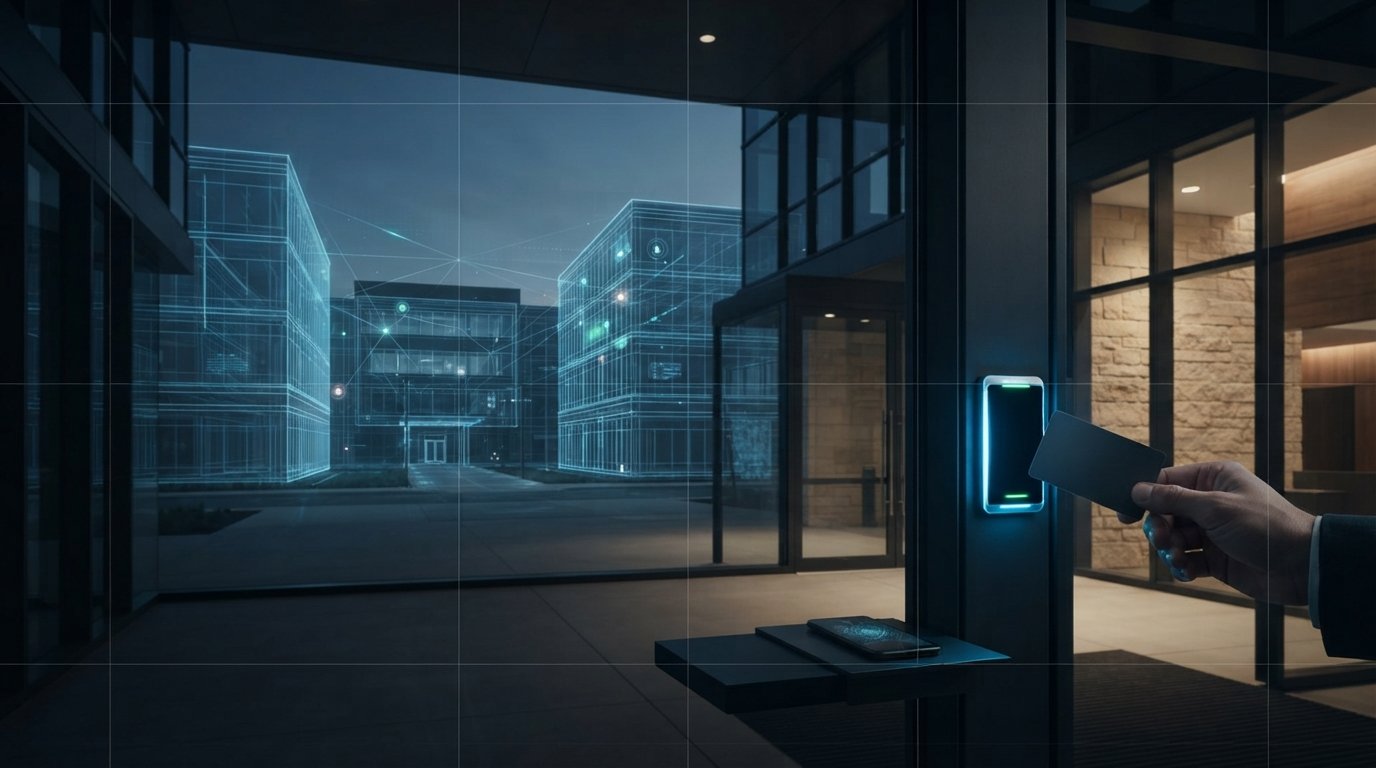
Traditional keys can often be replaced at business entrances with credentials such as cards, fobs, or mobile access, managed through an access control system. For businesses evaluating access control systems in San Antonio, these systems can simplify permission changes across buildings and create records of entry events. The result is a more manageable way to control who can enter, without relying on a physical key for every door.
This matters most when staff access changes, keys are difficult to track, or one credential needs to work across multiple locations. The right access control systems in San Antonio can support these needs when paired with suitable door hardware and carefully assigned permissions. Physical keys may still be appropriate for some doors or situations.
This guide explains how credential-based entry works, what to consider when managing access across buildings, and how entry records can connect with video and intrusion alerts. It also covers commercial system components, factors that shape project scope and cost, and how integrated design can support a more coherent building environment.
Key Takeaways
- Use credential-based entry to replace many traditional keys, while matching the access method to each door and user.
- Shape permissions around roles and locations so access changes can be managed without treating every building the same.
- Connect entry events with relevant video footage and intrusion alerts to give teams more context when reviewing activity.
- Choose between mobile, card, fob, code, and biometric credentials by weighing convenience, security needs, and how each will be administered.
- Plan a multi-building system around consistent policies, clear event records, and coordinated integrations rather than isolated doors.
Access-event audit trails and video integration
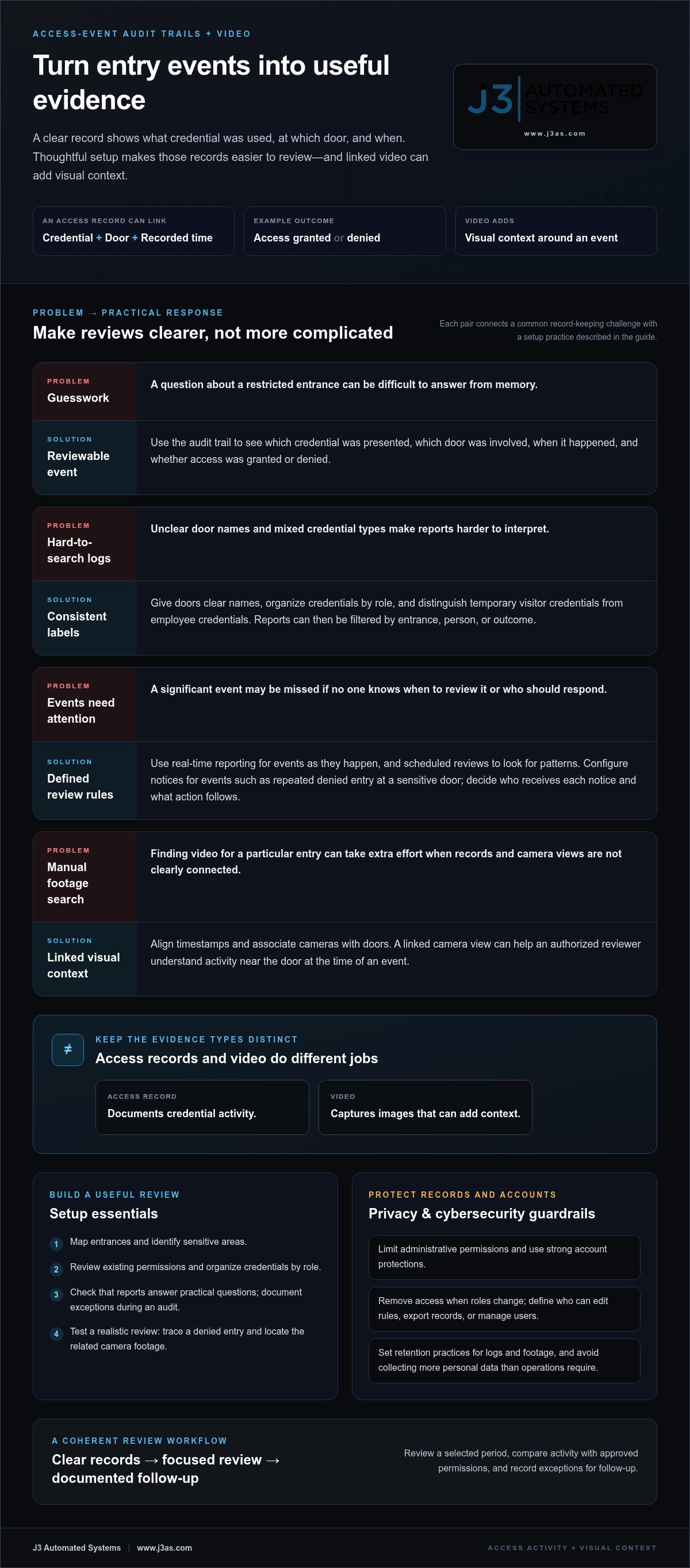
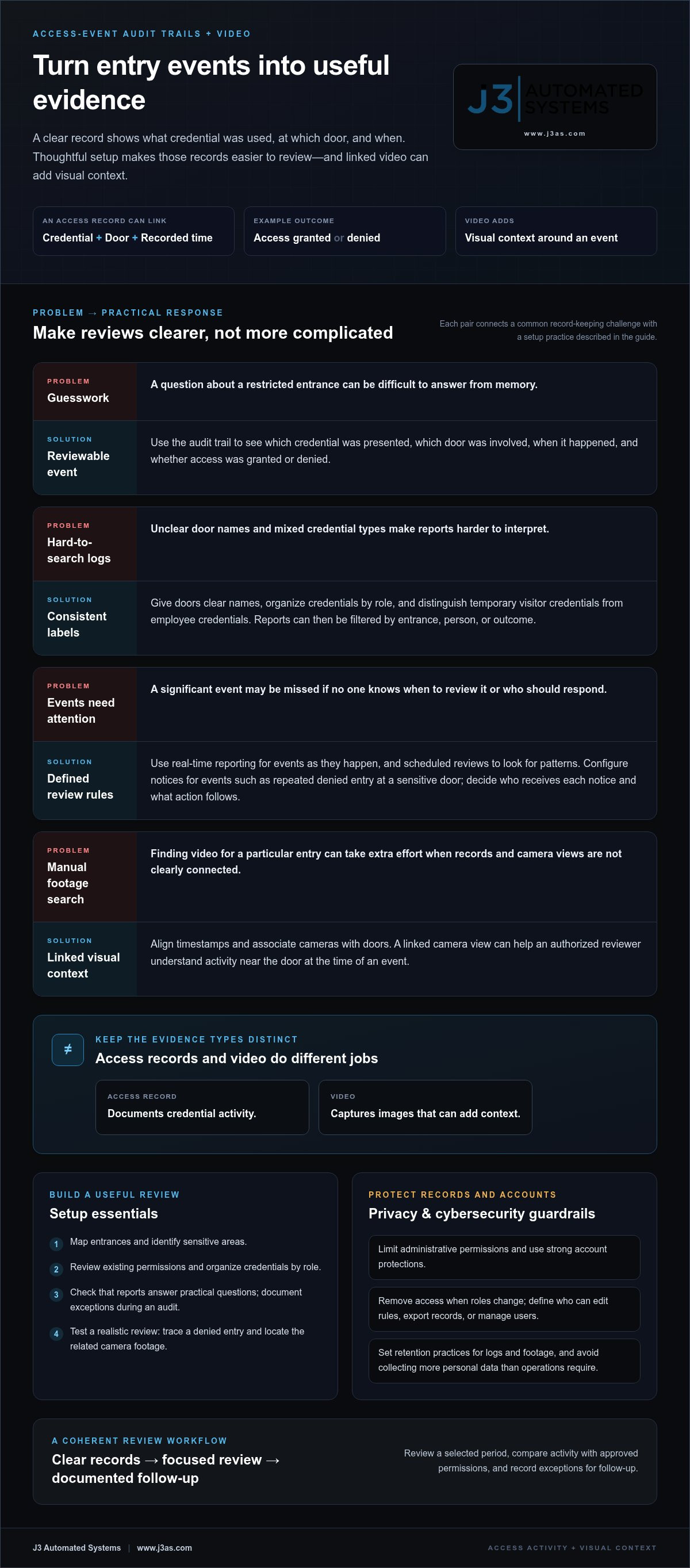
An access control system can create an audit trail of people entering and exiting a building. Each event can link a credential, a door, and a recorded time, giving managers a structured account of activity. For example, if a staff member’s card is used at a restricted entrance, the record can show which credential was presented and whether access was granted or denied. This replaces guesswork with a sequence that can be reviewed.
Useful records depend on thoughtful setup. Give doors clear names, organize credentials by role, and set permissions that reflect actual work areas. A visitor’s temporary credential, for example, should be distinguishable from an employee credential in reports. Consistent labels also make searches more effective: managers can filter events by entrance, person, or outcome instead of scanning an undifferentiated log.
Real-time reporting helps teams respond as events happen, while scheduled reviews can reveal patterns over time. Configure notifications for events that merit attention, such as repeated denied entry at a sensitive door. Decide who receives each notice and what action follows. For an audit, review a selected period, compare access activity with approved permissions, and document exceptions for follow-up.
Video integration adds visual context to an access event. If a record shows an entry at a loading-area door, a linked camera view can help an authorized reviewer understand what happened nearby. Systems should use aligned timestamps and clear camera-to-door associations; otherwise, finding relevant footage can become a manual search. Access records and video support review but serve different purposes: one documents credential activity, while the other captures images.
When choosing an access control vendor, compare its approach to assessing each door, managing credentials, reporting events, integrating video, and supporting the system. Ask for a walkthrough using a realistic scenario, such as reviewing a denied entry and finding the related camera footage.
Cybersecurity and privacy risks include unauthorized access to system accounts, exposure of entry records, and collecting more personal data than operations require. Limit administrative permissions, use strong account protections, remove access when roles change, and set retention practices for logs and footage. These measures reduce unnecessary exposure while preserving records for defined business purposes.
A security consulting and audit process should map entrances, identify sensitive areas, review existing permissions, and test whether reports answer practical questions. For example, a consultant can trace a visitor’s route from reception to an approved meeting space and identify where supervision or clearer access rules may be needed. This assessment gives the system a coherent structure before integrations or reporting workflows are configured.
ProTech Academy is a two-day, instructor-led training event. It can provide a setting for learning how to review access events alongside related video.
Cloud-based commercial access control
A cloud-based platform lets authorized administrators manage credentials and door permissions through a network-connected interface. For businesses comparing access control systems in San Antonio, the key decision is how the platform should support daily operations. Rather than visiting each entrance to change settings, a manager can revoke a departing employee’s credential centrally. Local readers, controllers, locks, and network connections still carry out access decisions at each door.
Cloud-based access management is useful when staff work across buildings or managers handle permissions remotely. An administrator, for example, can assign a new employee access to the main entrance and designated work areas, then remove those permissions when the employee’s role changes. Clear user groups and door labels help apply updates consistently. Small businesses should assess door count, staffing, access rules, and reporting needs before selecting a system.
Cloud-based and on-premise systems differ mainly in where management software and records are hosted. A cloud platform supports remote administration through an internet connection; an on-premise system keeps management infrastructure at the business. Both require compatible door hardware, network planning, permissions, and maintenance procedures. Cloud-based access control systems in San Antonio should be planned around each site’s connectivity and operational needs.
Cloud management also makes cybersecurity part of the design. Restrict administrator accounts to people who need them, use strong authentication, and promptly remove permissions when staff responsibilities change. Review account activity and define who can edit access rules, export records, or manage users. These practices help protect credentials and business entry records.
Commercial building and fire-safety requirements depend on the building, door function, and egress design. Identify how each controlled door operates during normal use and emergencies, then coordinate access devices with the building’s life-safety design. Permit and inspection needs in San Antonio depend on project scope, affected systems, and applicable local review.
Installation cost depends on the number and type of doors, hardware, wiring, network conditions, software configuration, and integration needs. Pricing is provided after a quote request. Installation duration depends on site conditions, access to work areas, and the sequence needed to keep entrances usable during the project.
Businesses evaluating access control systems in San Antonio can compare integrators by their design process, integration approach, administrator training, and support model. A walkthrough of a typical door and its management workflow can clarify how the system will serve the property. Connected building environments can also coordinate access planning with commercial building automation.
Integration with video surveillance and intrusion detection
Connecting access control, video surveillance, and intrusion detection gives security teams a clearer sequence of events. An authorized card read can be associated with a camera view, while a forced-door alert can direct attention to the relevant entrance. These systems still have distinct roles: access control manages credentials, cameras capture images, and intrusion devices detect defined conditions.
Start with the doors and areas that matter most. A staff entrance, reception vestibule, and stockroom may each need different camera views and alert rules. Map each controlled door to the nearest useful camera, then confirm that its view shows the approach and activity around the threshold. A camera aimed elsewhere may record the room but miss the event being reviewed.
Intrusion detection adds another signal to the sequence. A door contact, for example, can report that an entrance opened, while access records show whether someone used a valid credential. If the event is unexpected, an operator can review associated camera footage and follow the site’s response procedure. Set alert priorities so routine authorized entry does not compete with events requiring attention.
Intercom capabilities can support a controlled visitor process at entrances without nearby reception staff. A visitor can call an employee through the intercom, and the employee can assess the request before granting entry through the connected access system. Pairing the interaction with a camera view helps the employee see the entrance, while clear permissions determine which doors the visitor can reach.
Integration depends on compatibility and purposeful configuration, not simply placing devices on the same network. During design, document each door, camera, intrusion input, and intended response. Then test practical scenarios: a valid card entry, a denied credential, a held-open door, and an intercom call from an unrecognized visitor. Confirm that the right record, image, or alert appears for each event.
A security partner should explain how systems exchange events, which functions remain independent, and how administrators review activity. Ask for a demonstration using a real entrance, such as reception: show an intercom call, the camera view, the access decision, and the resulting event record. This walkthrough reveals whether staff can follow the intended process without switching between unclear screens.
Video surveillance also raises operational questions about camera placement, viewing permissions, and access to footage. Define who may review recordings and under what circumstances, then align those rules with workplace procedures. For a warehouse delivery, for example, staff may need to verify activity at the loading entrance without giving every credential administrator access to all camera feeds.
Well-planned integration turns separate signals into a useful operational picture. Choose the events that merit linked video or an intrusion alert, assign responsibility for reviewing them, and test the workflow at each selected entrance. This structure helps teams respond consistently while keeping access, video, and intercom functions clearly defined.
Mobile, card, fob, code, and biometric credentials
Commercial access systems can use mobile credentials, cards, fobs, keypad codes, or biometric readers. San Antonio businesses can select one method or combine options based on door function, user needs, and how credentials will be managed.
Credential Options
A mobile credential lets an authorized user present a phone at a compatible reader; cards and fobs provide physical alternatives. A keypad accepts a code, which can suit a shared entrance or temporary access need. Compare how each credential is issued, replaced, revoked, and used at each door. For example, a card may suit staff, while a short-term code can support a scheduled visitor.
Biometric Access Control
Biometric access control identifies a user through a physical characteristic, such as a fingerprint or facial pattern, rather than a card alone. Consider reader placement, how enrollment and removal work, and what alternate entry method is available if recognition fails. Limit biometric enrollment to locations where the added identification step serves a clear security purpose.
Credential selection should reflect how people move through each entrance. A reception door may use a visitor code issued for a defined purpose, while a staff-only area may require an individually assigned credential. Keep access rules distinct: a code intended for a delivery entrance should not automatically open offices or storage areas.
Biometric two-factor authentication combines a biometric check with another factor, such as a card or mobile credential. This creates a two-step entry process that may suit a restricted room where one credential alone is insufficient. Map both steps to the entry workflow, and decide who can enroll users or change the required factors.
Credential administration matters as much as reader choice. Create a process for issuing credentials, recording the assigned user, and disabling access when employment or duties change. If a staff member reports a lost fob, an administrator should be able to identify its permissions and revoke it without changing other users’ access.
Keypad codes need deliberate handling. Assign codes for a defined use, avoid distributing a shared code more widely than necessary, and replace it when the authorized group changes. For a contractor entering a service area, a limited code can be easier to manage than lending a permanent employee credential.
Before deployment, test each credential type at its intended door. Check that a mobile credential opens only assigned entrances, a visitor code follows its access limits, and a biometric reader handles enrollment correctly. Documented testing helps align the reader, permissions, and daily procedures before staff rely on them.
Access control for multiple doors and buildings
For a business with multiple entrances or locations, access rules need a clear structure. Group doors by building, department, and function, then define which roles can enter each group. A facilities manager might need access to service areas across sites, while a receptionist needs access only to the main entrance and lobby.
Begin with a door schedule. Record each entrance’s location, purpose, reader, locking hardware, and any connection to cameras or alarms. This inventory helps identify where permissions should match and where they need to differ. A shared rule might cover employee entrances, for example, while a server room requires a distinct authorization process.
Central administration can make routine changes more consistent. If an employee transfers to another office, update their assigned role instead of editing every door individually. Keep exceptions explicit: a temporary project team may need access to one building without gaining entry across the entire portfolio.
Buildings may have different operating patterns, even within the same organization. A warehouse entrance could support deliveries during defined operating periods, while an office lobby follows staff schedules. Configure automatic access schedules only when they fit site procedures, and establish who can override or revise them.
For a multi-site organization, organize records by location and use consistent names for doors. “North office, loading entrance” is easier to identify than an ambiguous label such as “Door 3.” Clear naming also supports reports, maintenance, and incident reviews when teams coordinate across buildings.
Plan network and system connections alongside permissions. A remote site with limited connectivity may require different operational planning from a central office. Identify what happens if a connection is interrupted, which local functions continue, and how administrators learn about communication issues. These decisions should align with the site’s entry procedures.
Test the design at each building before relying on it. Use sample roles, such as employee, visitor, and facilities staff, and confirm access at every assigned entrance. Check camera views and door schedules during the same walkthrough. Record exceptions, correct permissions, and repeat the test after changes.
Multiple buildings may also coordinate access with other building systems, such as HVAC controls or lighting schedules. Map these interactions carefully so an entry rule does not unintentionally change unrelated operations. For help planning an integrated building environment, discuss coordinated building systems as part of the project design.
J3 Automated Systems: Cinema-grade home theater
J3 Automated Systems helps clients shape connected environments through its confirmed automation offerings. For a commercial property considering access control, its commercial building automation (HVAC/BMS) can address how building operations are organized alongside a broader technology plan. The scope should stay clear: access permissions and entry records require their own defined system and workflows.
For residential projects, J3 Automated Systems also designs cinema-grade home theater, whole-property audio, and automated lighting and shades. These systems serve different needs, but each benefits from deliberate planning around how people use the space and how its technology should operate.
If your project involves coordinating building automation with a larger property plan, contact J3 Automated Systems to discuss the requirements. You can also visit www.j3as.com.
Plan the next step for your property
A sound plan for access control systems in San Antonio starts with understanding how people use the property, where entry decisions belong, and who will manage them. Map operational priorities first, then decide how the technology should fit the building’s wider environment. This approach keeps security decisions distinct and helps prevent disconnected systems and workflows.
For projects that also involve the experience of a space, J3 Automated Systems offers cinema-grade home theater, whole-property audio, and automated lighting and shades. These offerings address separate needs, but benefit from considered planning across the property. The right next step is to define what your business needs from its entry processes and what other systems belong in the broader project.
Contact J3 Automated Systems to discuss your property’s automation priorities and how its environment can work together. A thoughtful plan can make the next decision clearer.
Frequently Asked Questions
Can access control replace traditional keys?
Yes, credential-based entry can replace traditional keys at doors configured for electronic access. Staff can use assigned credentials, and administrators can revoke access without collecting a physical key. Some businesses may retain mechanical keys for selected doors or contingencies. For a San Antonio office, decide which entrances need individual permissions and which can remain under conventional key control.
Can access control systems be managed remotely?
Yes, cloud-managed systems can let authorized administrators change permissions remotely through their management platform. A manager, for example, can remove a former employee’s access or update a temporary worker’s assigned doors without being onsite. Remote administration depends on network connectivity and account permissions, so establish who can make changes and how those actions are reviewed.
What types of businesses need access control?
Access control can suit businesses that need different entry permissions for staff, visitors, or work areas. Offices, warehouses, studios, and multi-tenant properties may use it to separate public entrances from staff-only spaces. This can be relevant for organizations in San Antonio, New Braunfels, Seguin, Bandera, Boerne, Austin, and San Marcos, especially when roles or access needs vary.
How do access control systems integrate with cameras, alarms, and visitor management?
Integration can connect an entry decision with a camera event, an intrusion signal, or a visitor workflow. For example, reception can record a guest’s arrival, notify the host, and follow the organization’s defined entry procedure. Before deployment, map how each system passes information and who responds to alerts. Test a visitor arrival and an unexpected door opening to confirm the intended sequence.
What are the best access control systems for small businesses in San Antonio?
Choose a system based on door count, staffing, access rules, and reporting needs. Cloud management can be useful when staff work across buildings or administrators need to manage permissions remotely.