AI integration for business in New Braunfels: systems and tools

The smartest AI upgrade may be the one your team barely notices. AI integration for business in New Braunfels means connecting AI capabilities to the software, data, and workflows you already use, so information can move between systems and support useful work instead of creating another disconnected tool. The right approach starts with a specific business need, then accounts for data quality, system compatibility, security, and human oversight.
It’s reasonable to expect a new tool to save time, but its value depends on how well it fits the way your business operates. AI can help employees summarize information, organize work, and surface patterns, while people remain responsible for judgment and important decisions.
This guide explains what AI integration involves and how to assess tools for your workflows. It also covers connecting AI to existing business systems, using operational data to spot trends and risks, and deciding when a focused integration or custom development makes more sense.
Key Takeaways
- Start with a clearly defined workflow problem, then choose between an existing product and custom development based on system fit and the complexity of your requirements.
- Map how information moves through your current tools before connecting AI, and account for data quality, permissions, secure access, and human approval.
- Use predictive analytics to surface operational patterns, emerging risks, and unusual activity that may otherwise be difficult to spot.
- Build a technology stack around the work your team already does, integrating AI into tools for communication, documents, meetings, and collaboration where it makes sense.
- Plan for ongoing monitoring and refinement so integrations remain useful, secure, and aligned with changing workflows.
Choosing between custom development and existing products
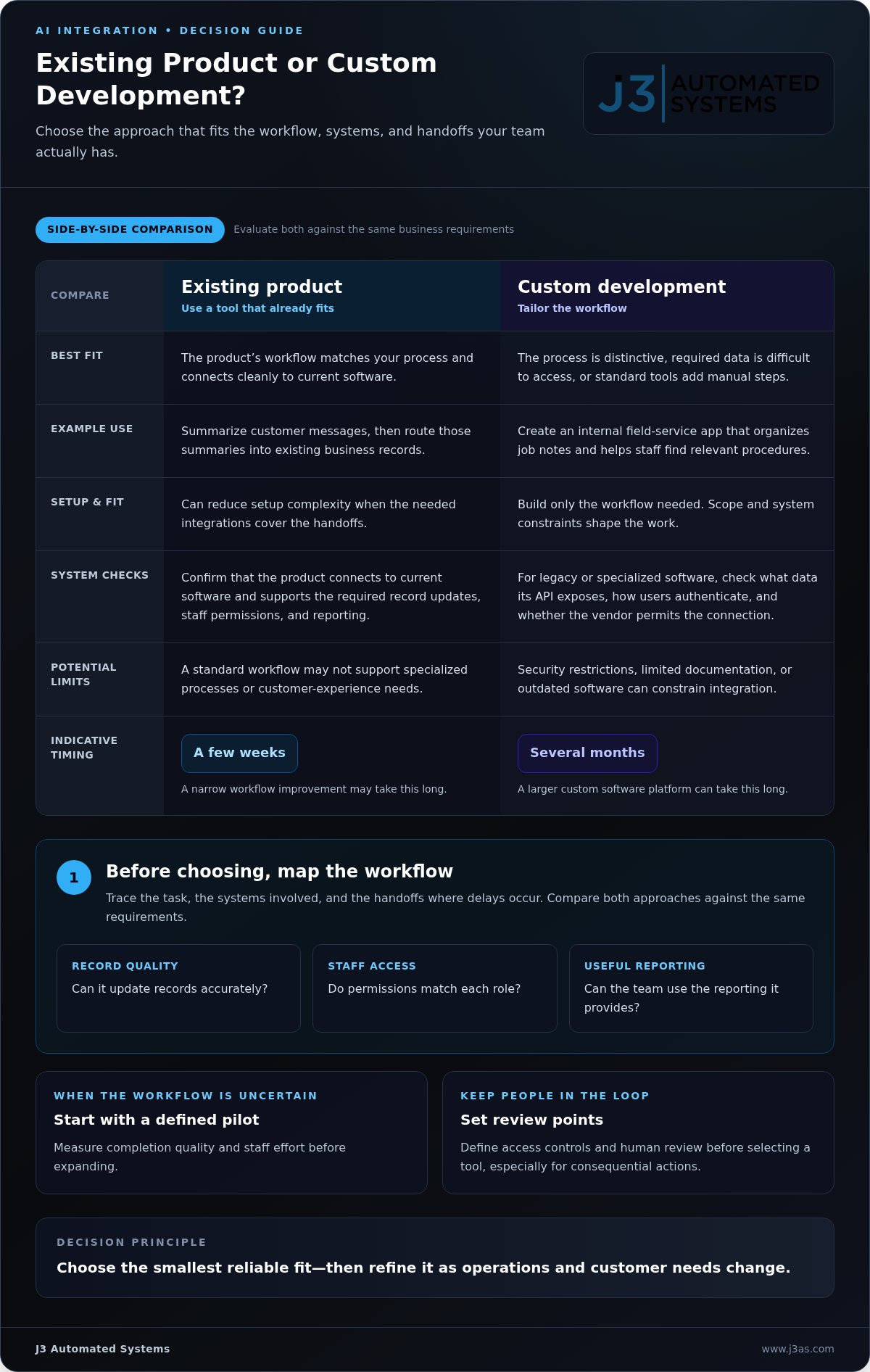
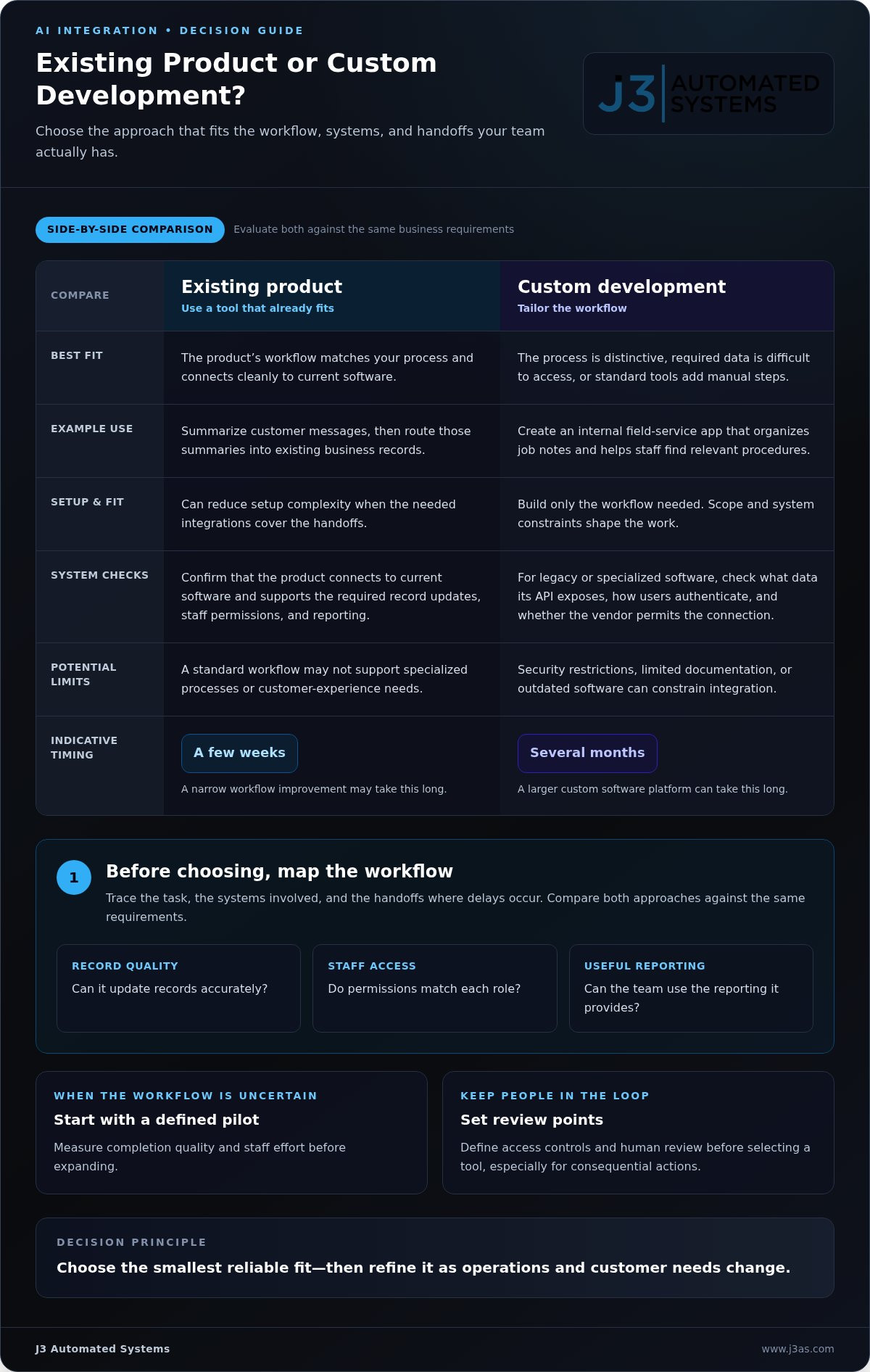
Choose an existing product when its workflow matches your process and connects cleanly to your current software. For example, a service business might use an established tool to summarize customer messages, then route summaries into its existing records. This can reduce setup complexity. Custom development is more useful when the process is distinctive, the required data is difficult to access, or standard tools create extra manual steps.
Use a practical test before committing: map the task, the systems involved, and the handoffs where delays occur. Then compare an existing product with a custom option against the same requirements, such as accurate record updates, staff permissions, and usable reporting. A narrow workflow improvement may take a few weeks; a larger custom software platform can take several months. Scope and system constraints shape the timeline.
For a New Braunfels business, relevant privacy and compliance requirements depend on the data, industry, and use. Local, Texas, and federal rules may apply together. Map customer, employee, and financial information, record why each workflow uses it, and define access controls and human review before selecting an AI tool.
Legacy and specialized software often requires a closer look at its application programming interface, or API. An API is a controlled route for systems to exchange information. Before designing a custom connection, identify what data the older system can expose, how it authenticates users, and whether its vendor permits the intended connection. Security restrictions, limited documentation, or outdated software can constrain integration. A carefully scoped API can still automate a specific handoff, such as transferring an approved service request into a scheduling workflow.
Custom AI software or a mobile app can fit a process that existing products cannot support. For example, a field-service team might need an internal app that organizes job notes and helps staff find relevant procedures. Define the user, input, output, and human decision point first. Build only the workflow needed, then test it under real operating conditions. This keeps innovation tied to a practical business result instead of features without a clear purpose.
AI-assisted marketing can organize customer feedback, identify recurring questions, and help teams tailor follow-up. For example, a business could group inquiries by service need, then review those themes before updating its messaging. Treat generated customer insights as signals, not final judgments. Staff should validate patterns against source records, protect personal information, and retain responsibility for customer-facing decisions. This can support a more responsive experience without removing human attention.
Use these decision points to choose a direction:
- Choose an existing product when its workflow fits and its integrations cover the needed handoffs.
- Choose custom development when legacy systems, specialized processes, or customer experience needs require tailored logic.
- Start with a defined pilot when the workflow is uncertain; measure completion quality and staff effort before expanding.
For AI integration for a New Braunfels business, agility comes from selecting the smallest reliable fit, then refining it as customer needs and operations change.
Integrating AI with existing business systems
Effective integration connects AI to the records and workflows employees already use. Start by mapping data flows, system permissions, and the decisions that require human approval.
For a customer relationship management system, define exactly what AI may read and update. It might summarize a service conversation, classify the request, and prepare a draft CRM note. Staff can review that note before it becomes part of the customer record. This workflow reduces repeated entry while preserving a clear human checkpoint.
Next, map CRM fields to the information AI needs. Customer identity, inquiry type, service history, and follow-up status must retain consistent meanings across connected software. Test duplicate records, missing fields, and unusual requests before expanding the integration. A business serving New Braunfels customers can apply the same handoff logic across teams while preserving the right customer context.
System reliability also depends on the surrounding technology. AI-driven monitoring tools can identify IT issues before users experience disruption. AI can help support stability by predicting failures, optimizing performance, and helping teams recover faster. For example, an alert about unusual system behavior can prompt IT staff to investigate before a scheduling or CRM workflow becomes unavailable. High-quality data and consistent connectivity remain essential.
Human Review and Guardrails
Guardrails define which tasks AI can perform, which records it can access, and when a person must intervene. For example, AI may draft a customer response, while an employee approves it before sending. Employee performance summaries should support human review, not replace judgment. Set review points for consequential actions, and limit access to the information each workflow requires.
Integration Risks
Security, privacy, accuracy, and job displacement are practical risks to address during implementation. Use authorized access, appropriate permissions, and secure API connections, especially when linking financial systems. Keep sensitive financial actions subject to human approval where required. Limit exposure of personal or employee information, test outputs against source records, and define accountable reviewers.
AI can augment employees rather than replace people, particularly when automation handles repetitive steps and staff retain complex decisions. Explain how the workflow changes, train employees on review procedures, and monitor errors or unexpected outputs. Transparency, accountability, data protection, and activity logs help maintain oversight as operations evolve.
For a structured approach to connecting AI with business processes, define the system handoffs, permissions, and review points before deployment.
Predictive analytics and business data insights
Predictive analytics turns operational records into signals that can inform decisions. For a New Braunfels service business, that could mean examining demand, scheduling, and completed work together.
Data Analysis and Predictive Insights
Begin with a specific decision, such as staffing for expected service demand. Gather the relevant records, align categories across systems, and review how patterns change over time. AI can analyze operational data continuously, surface trends and risks, and identify anomalies earlier. A sudden change in cancellation patterns, for example, can prompt a manager to investigate before adjusting schedules.
Useful intelligence depends on data that reflects real operations. If one team records a completed visit as “closed” while another uses “done,” analysis may split the same outcome into separate categories. Standardize labels, remove duplicate entries, and identify missing records before drawing conclusions. Then compare AI-generated patterns with source records and staff knowledge. This makes insights easier to interpret and act on.
Computer vision and video analytics apply AI to visual information. In a warehouse, image analysis might help identify recurring congestion near a loading area; in a service environment, it could help assess equipment conditions from images. Define the exact question first, such as identifying a visible obstruction. Limit analysis to relevant footage, set access rules, and keep a person responsible for interpreting results. Visual outputs need context, not automatic assumptions.
Data Analytics and AI Consulting
Analytics planning connects a business question to usable data, an appropriate model, and a decision process. A consultant can help map source systems, test data quality, and select measures that reflect the intended outcome. For example, a service manager might track repeat visits alongside job type. That comparison can reveal where procedures need refinement, rather than simply counting completed work.
Real-time trend analysis is most useful when a timely signal can change an action. A team might monitor incoming requests and completed appointments to spot a developing backlog. AI can surface shifts as operational data arrives, while a manager decides whether to adjust assignments or communicate a delay. Set a clear alert threshold based on workflow needs, then review whether alerts lead to meaningful action.
Keep analysis scalable by separating the initial use case from later expansion. A practical sequence is:
- Define the decision: name the action the insight should support.
- Trace the data: identify its source, format, and gaps.
- Test the output: compare predictions with actual outcomes and staff review.
- Refine the workflow: retain signals that help decisions and adjust those that distract.
This structure turns analytics into an operating discipline, not just a dashboard. A clear owner, review cadence, and decision path help teams use insights consistently as demand and business priorities change.
AI tools and technology stacks for service businesses
A service business should select artificial intelligence tools around its daily work, not novelty. Start with one workflow, such as converting meeting notes into assigned follow-up tasks. Identify the software already in use, the information each tool needs, and the employee responsible for reviewing results. This creates a defined foundation before implementing more automation.
Workplace tools can support email, documents, meetings, and collaboration. AI features can summarize information, prioritize tasks, and accelerate work within those applications. For example, a team could turn project meeting notes into a draft action list, then have its coordinator assign owners. Cloud platforms provide computing power, data access, and scalability for AI systems. Choose a technology stack that connects those capabilities to existing workflows without multiplying disconnected tools.
AI-native engineering starts with the process, then shapes the technical solution around it. A service company might need an internal tool that gathers job details, organizes technician notes, and makes procedures easier to find. Define user roles, data inputs, and expected outputs before development. Then test the workflow with realistic examples, including incomplete job notes and changed appointments. This keeps custom software focused on an operational need.
For teams coordinating work across New Braunfels and Seguin, dispatch and collaboration tools can help employees share job status, customer updates, and schedule changes. A consistent handoff lets office staff and field employees see the same current information. It also helps managers identify a delayed appointment before it disrupts later work. Define how teams record changes so updates remain clear across locations and systems.
Managed IT capabilities can support AI adoption through system monitoring, access management, and maintenance of the technology environment. AI-driven monitoring tools can detect IT issues before users experience disruption. Automated remediation can resolve common IT issues, while staff handle exceptions that need judgment. AI-powered security tools can analyze behavior, detect anomalies, and respond faster than traditional systems. Include security oversight in the operating plan, with defined permissions and a process for reviewing alerts.
Build the stack in deliberate layers, so each tool has a clear role:
- Workplace layer: connect email, documents, meetings, and collaboration tools to relevant AI functions.
- Data layer: establish which records can be accessed and how information moves between systems.
- Operations layer: define monitoring, escalation, and human review for automated actions.
- Growth layer: expand only after teams validate the workflow and its outputs.
This sequence helps service businesses implement a secure, coherent system rather than a collection of isolated applications. Adoption planning can reduce fragmented tools and inconsistent outcomes as workflows change.
Integrations with existing business tools
An AI tool becomes useful when it works with the platforms employees already rely on. Consider a service request that begins in an online form, enters a work-management system, and generates a customer update. Integration connects those steps, so staff don’t copy the same details between applications. The practical goal is a complete workflow, not simply adding an AI feature to one screen.
Start by drawing the path of one routine task. For example, trace a customer inquiry from intake through assignment, service completion, and follow-up. Mark where information changes hands and where employees retype or interpret it. Then decide what AI should do at each handoff, such as classify the inquiry or draft a status update. Keep actions clear: AI prepares information, while authorized staff approve consequential changes.
Next, choose how the systems will exchange data. A built-in connector can suit common platforms and standard workflows. An application programming interface can support a more tailored connection, provided the systems allow the required access. Middleware can coordinate several tools when a task crosses multiple applications. For instance, a scheduling platform could pass an appointment change to an internal tool, which prepares a revised customer message for approval.
Matching information matters as much as connecting applications. A customer record might use “job status,” while another platform calls the same field “service stage.” Define shared meanings before building the link, then test missing values, duplicate entries, and changed records. Also specify whether each connection can read data, create records, or edit existing information. Least-privilege permissions reduce unnecessary access across connected tools.
Plan for failures before expanding a workflow. If a connection times out, the system should record the failed task and provide a clear route for staff review. If an AI-generated summary omits a customer constraint, employees need access to the original request. Monitor error logs, review sample outputs, and document who owns each exception. These steps keep the process understandable as the business and its platforms grow.
A measured rollout makes integration easier to evaluate. Begin with one workflow and a defined group of users. Compare the previous process with the connected version by reviewing duplicate entry, unresolved errors, and completed handoffs. Gather employee feedback, correct field mappings, and adjust permissions before extending the design. Expand only when the workflow’s outputs remain useful and responsibilities stay clear.
- Map the handoffs: identify which platform creates, receives, and acts on each record.
- Set boundaries: specify data access, approval points, and exception ownership.
- Test the whole path: include incomplete information and connection failures.
- Refine before scaling: use staff feedback and error reviews to improve the workflow.
For a defined plan to connect AI with existing workflows, plan an AI business process integration.
J3 Automated Systems: Cinema-grade home theater
J3 Automated Systems is a natural next step when your project extends beyond business software into the systems that shape a physical environment. For commercial spaces, building automation for HVAC and building management systems can coordinate key building functions. For homes, cinema-grade home theater, whole-property audio, and automated lighting and shades bring connected experiences into everyday spaces.
These services address a different layer than AI tools for customer records or internal workflows. They’re relevant when you’re planning how a business operates as a physical space, or how technology should work throughout your home. A clear project goal helps guide the conversation, whether that’s refining building operations or designing an immersive home theater experience.
Contact J3 Automated Systems to discuss the right next step for your project.
Shape the next step around your business
The next step is to choose a business process where better-connected information could make work clearer, then define what should change for employees and customers. A focused plan for AI integration for a business in New Braunfels can connect that operational goal with the systems and physical environment supporting it. Keep the intended outcome visible as the project takes shape, so each decision serves a practical purpose rather than adding complexity.
Technology also shapes how people experience a space. J3 Automated Systems offers cinema-grade home theater, whole-property audio, and automated lighting and shades, bringing coordinated experiences to residential environments. These offerings complement a broader view of how connected systems can support daily routines, comfort, and control.
When you’re ready to discuss a project that brings intelligent systems into clearer alignment, contact J3 Automated Systems today. A thoughtful next step can turn a promising idea into a more coherent plan.
Frequently Asked Questions
What Exactly Is AI Integration?
AI integration connects artificial intelligence with business software and processes to support specific work. It differs from using a separate chatbot because it links AI capabilities to a task, such as sorting incoming requests or preparing information for an internal report. The business defines the task, the systems involved, and the appropriate human role. The result is a designed workflow, not simply access to an AI tool.
Why AI Is No Longer Optional?
AI isn't universally mandatory, but businesses may find it harder to meet changing expectations when routine work remains entirely manual. The relevant question is whether AI can address a real operational need, such as organizing incoming requests or producing a first draft for staff review. If existing processes already serve customers well, adoption can be deliberate. Start where a measurable improvement matters, rather than adopting technology for its own sake.
What AI integration services do businesses in New Braunfels, Texas need most?
Useful services depend on where work slows down. A company managing repeated inquiries may benefit from AI-supported intake and follow-up; a team with specialized internal procedures may need a custom web app or internal tool. J3 Automated Systems provides AI integration into existing business processes and develops custom software. Map the task, systems, and employee responsibilities to identify which kind of support fits the need.
Which New Braunfels companies provide AI consulting and business integration services?
J3 Automated Systems provides AI integration and custom software development for business processes. Its work includes mapping workflows and building tailored tools, rather than selling off-the-shelf software products. The company serves businesses across Texas, including San Antonio, New Braunfels, Seguin, Bandera, Boerne, Austin, and San Marcos. For a business seeking an integrated approach, define the process to improve and the systems it needs to connect.
What are common business use cases for AI in New Braunfels, such as customer service, marketing, and operations?
Common use cases include organizing customer inquiries, drafting marketing content for staff review, and preparing operational reports from business records. A service company could use AI to group incoming requests by topic, helping employees direct them to the appropriate team. Marketing staff could use it to create an initial campaign outline, then refine the language. In each case, employees verify details before information reaches customers.
How can a New Braunfels business assess whether it is ready to adopt AI?
A business can assess readiness by selecting one process and examining its inputs, outputs, and ownership. Check whether employees record information consistently, whether the relevant software can provide authorized access, and who will review AI-generated work. For example, a team with inconsistent customer categories should standardize those labels before relying on automated sorting. Readiness means the task, data, permissions, and human responsibilities are clear.
What steps are involved in integrating AI with existing business software and workflows?
Begin by choosing a defined business task, then document the software and information involved. Identify what AI should produce and which employee approves or acts on that output. Next, connect systems through an appropriate integration method, set access permissions, and test typical and unusual cases. For example, test a request with missing details before expanding automated intake. Review errors and staff feedback, then refine the workflow.
How can businesses compare AI consultants, software platforms, and implementation options in Central Texas?
Compare options by matching the solution to the process, existing systems, and level of customization required. A platform may fit a standard task; custom development may better suit a specialized workflow or internal tool. Assess whether the implementation includes process mapping, system connections, and a clear plan for staff oversight. J3 Automated Systems designs and builds tailored automation solutions for physical spaces and business processes throughout Texas.