Network Installation Services in Boerne: Equipment and Fees
The smartest network purchase may be the one you postpone. For network installation services in Boerne, choose equipment only after defining the layout, device load, and performance needs. You can buy your own equipment when you know what the system requires, but a reliable installation depends on how the hardware, cable runs, and connections work together.
It’s reasonable to want control over equipment choices and avoid paying for components that don’t suit your space. Plan the infrastructure first so every router, switch, access point, and cable serves a clear purpose instead of becoming a costly guess.
This guide explains how to decide what to buy, what infrastructure design and cable certification contribute, and which factors shape installation fees and offer terms. You’ll also see how an engineered network can support the way a home or business operates, with fewer mismatches between equipment and the environment it serves.
Key Takeaways
- Plan your network around the space, devices, and performance needs before choosing routers, switches, or other equipment.
- Understand how cable testing and certification can help identify installation issues and document cable performance.
- Compare installation offers by looking closely at the work included, equipment responsibilities, and terms, not just the headline fee.
- Expect installation costs to reflect factors such as the site layout, cable routes, and scope of work.
- Use infrastructure design to coordinate cabling and equipment into a network that can support the way your home or business operates.
Patch panels, routers, hubs, and switches
These components have distinct roles, so select them according to the network layout rather than treating them as interchangeable. A router directs traffic between your local network and the internet. A modem connects the property to its internet service. Some devices combine both functions, while a separate switch distributes wired connections to computers, televisions, and other equipment.
A patch panel organizes cable runs at a central point. Each fixed cable from a room terminates at the panel, where it connects to a switch through a short patch cable. This makes changes easier: move a patch cable to another switch port instead of tracing a long cable through walls. Label both ends of each run, such as “office” or “conference room,” to simplify troubleshooting.
A switch connects devices within the local network and sends traffic to its intended destination. For example, a desktop computer can access a network printer through the switch without sending that local traffic through the router first. A hub works differently: it repeats incoming data to every connected port. This can create unnecessary traffic, so a switch is generally the more suitable choice for a modern wired network.
Start with the internet service and the work the network must support. The Federal Communications Commission defines broadband internet as at least 100 Mbps download and 20 Mbps upload. Compare that benchmark with the demands of video calls, cloud applications, streaming, and file transfers. The internet plan sets the connection entering the property; the router, switches, and cabling determine how that connection is distributed inside.
Internet providers in Boerne may offer different service types and contract terms, so compare plans available at the property address. Review advertised download and upload speeds, equipment charges, contract length, and conditions for ending service. Ask whether the provider requires its modem or router, then plan the remaining equipment around that requirement. Avoid paying for overlapping functions when one device already performs them.
Eligible low-income households can receive an internet-service discount through Lifeline. According to the Federal Communications Commission, the discount is up to $9.25 per month. The Federal Communications Commission states the Lifeline eligibility threshold as 135% of the Federal Poverty Guidelines. These details concern the service bill, not the choice of router or switch, but they may affect the total connection plan.
Before buying equipment, map the connection path: provider equipment, router, switch, patch panel, then wired devices. Count the required connections and identify where wireless access is needed. This sequence helps you select compatible components, avoid duplication, and plan a network that can be maintained without guesswork.
Cable testing and certification
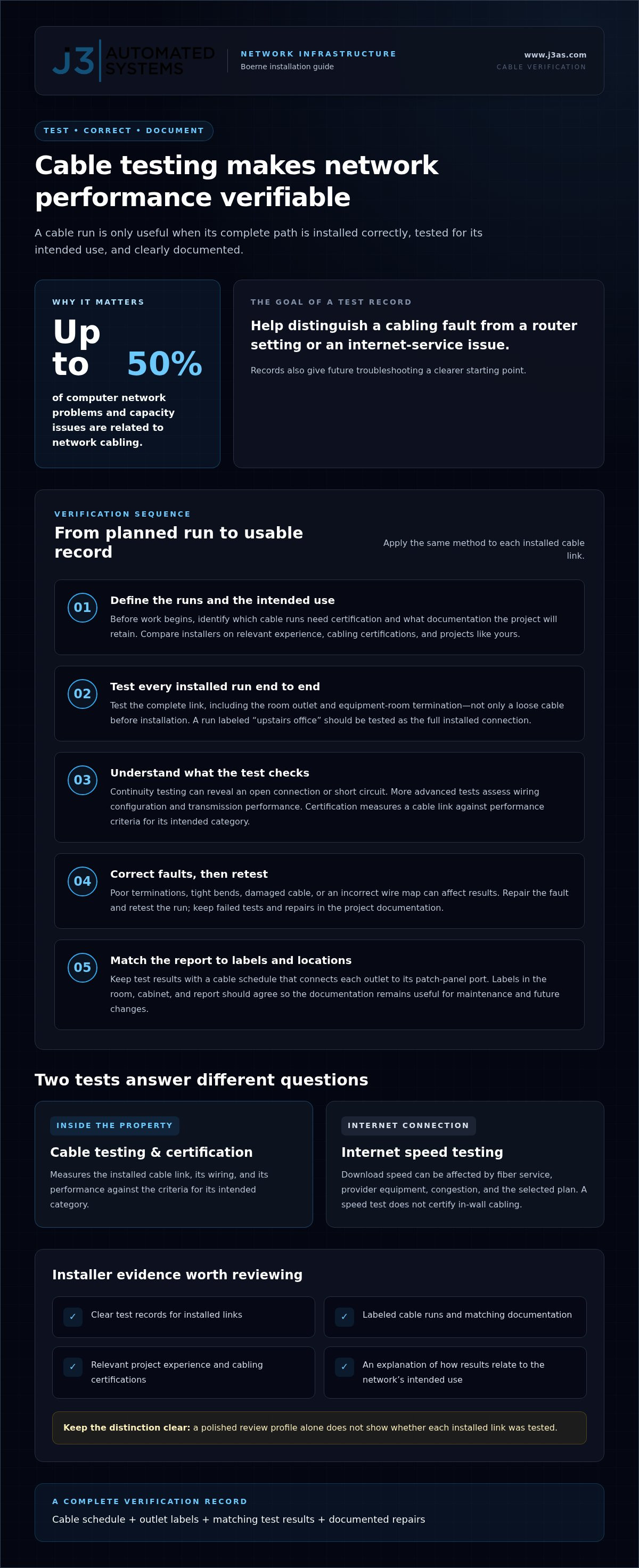
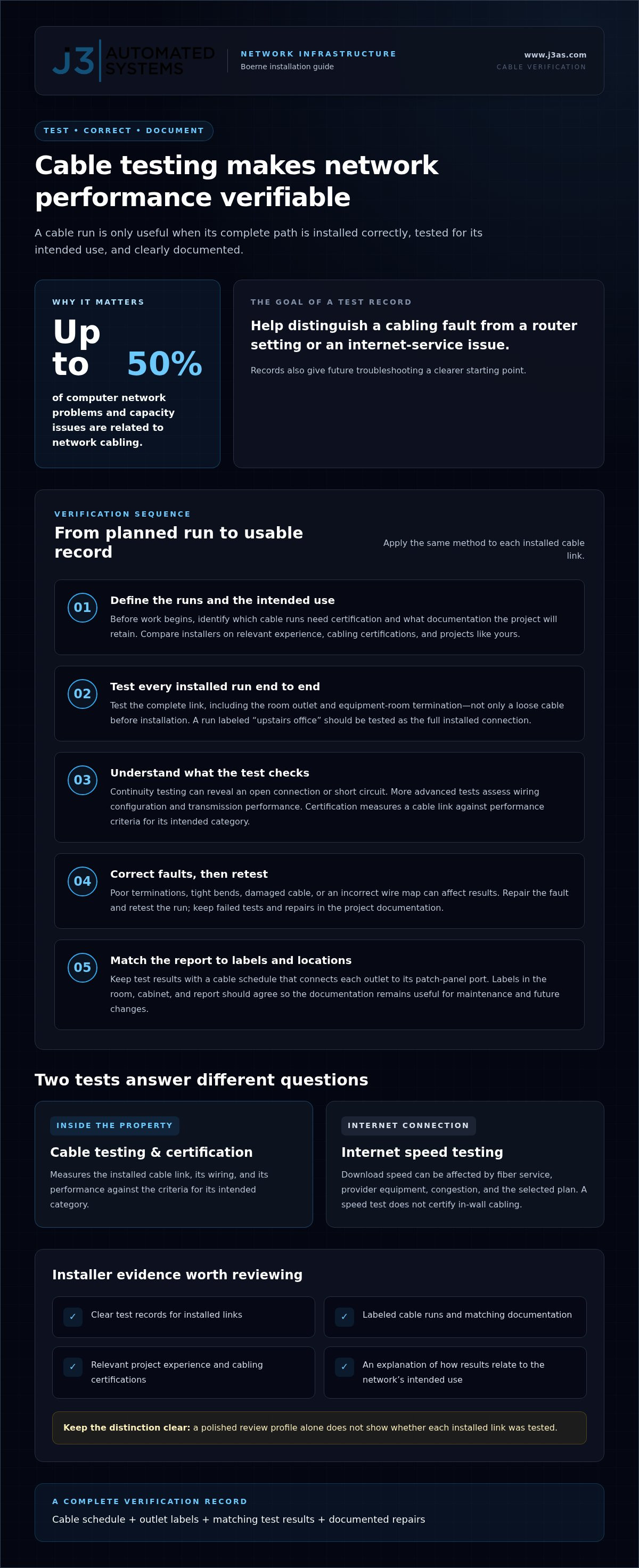
Compare Boerne installers by reviewing customer feedback, experience with projects like yours, and relevant cabling certifications. Useful evidence includes clear test records, labeled cable runs, and explanations of how results relate to the network’s intended use. A polished review profile alone doesn’t show whether each installed link was tested.
Cable testing checks whether a physical connection is assembled and performing as intended. A basic continuity test can reveal an open connection or short circuit, while more advanced tests assess wiring configuration and transmission performance. Certification goes further by measuring a cable link against performance criteria for its intended category. The final record helps show whether a run suits the planned network.
Test every installed run from end to end, including the outlet and equipment-room termination. For example, test a cable labeled “upstairs office” as a complete link, not just as a loose cable before installation. Poor terminations, tight bends, damaged cable, or an incorrect wire map can affect the result. Correct the fault, then retest the repaired run.
Up to 50% of computer network problems and capacity issues are related to network cabling. That makes test records useful when troubleshooting slow speeds, intermittent communications, or a device that repeatedly disconnects. A report can help distinguish a cabling fault from a router setting or an issue with internet service. It also gives a future technician a clearer starting point.
Keep test results with a cable schedule that identifies each outlet and its corresponding patch-panel port. A labeled run from the reception desk, for example, should match in the room, cabinet, and report. Consistent records support maintenance and make later changes more orderly. Include failed tests and repairs in the project documentation, not just the final passing result.
Keep internal cable testing separate from internet speed testing. Fiber service, provider equipment, congestion, and the selected plan can affect download speeds, while cable certification measures the installed link. A household may have no data caps under its plan, but that doesn’t establish whether its in-wall cabling meets the network’s needs. Each test answers a different question.
Before work begins, define which cable runs need certification and what documentation the project will retain. After installation, review the test report alongside the outlet labels and network layout. For spaces where network connectivity supports integrated systems, integrated systems planning can help align the physical infrastructure with the way the space is used.
Boerne network cabling installations can range up to hundreds of cable outlets for a complete data center installation. For a project of that scale, agree on a consistent naming scheme before testing begins and ensure every result matches its outlet and termination. Organizing records as work progresses keeps the final documentation useful for troubleshooting, repairs, and network changes.
Installation charges and offer terms
Compare the written scope, not just the headline charge, when reviewing an installation offer. A clear proposal separates labor, equipment, cabling, testing, and any internet plan charges.
Site Surveys and Estimates
Survey and estimate terms depend on the offer. The written estimate should state whether the site visit is free or charged and explain what the assessment covers. A useful survey records cable routes, equipment locations, access constraints, and the rooms or work areas needing connections. An office retrofit, for example, may require different planning from a new-build installation.
Which companies provide network installation services in Boerne, TX? Network cabling contractors and technology integrators handle physical infrastructure, while internet service providers typically manage the connection and equipment tied to their plans. The proposed scope clarifies which company handles each part.
Do installers serve nearby areas such as Fair Oaks Ranch and San Antonio? Service areas differ, so the written offer should identify the installation address and any travel or access conditions. Treat nearby locations as included only when the proposal names them.
What warranties and ongoing support do Boerne network installation services provide? Contract terms should distinguish installation workmanship from hardware warranties and explain which support tasks are covered. Look for the support channel, coverage limits, and how requests are handled after project completion.
Installation Timeframes
How long does a typical network installation take in Boerne? The schedule depends on the scope: installing equipment in an existing cabinet differs from routing new cable through occupied rooms. The proposal should identify the work sequence, required access, and milestones such as cable completion, testing, and handover. Site conditions and coordination with other trades also shape the schedule.
Review internet plans separately from the installation scope. A broadband plan may include its own setup terms, equipment charges, contract period, and data caps. An advertised discount, for example, may apply only under specific enrollment conditions or contract terms. Compare the regular charge with the discounted period, then note when the actual billing changes.
Treat that offer as separate from network cabling work: an online discount on an internet connection doesn’t automatically cover wiring, equipment configuration, or testing. Check which installation the offer covers and whether the plan meets the property’s needs.
Before accepting, compare proposals line by line. Confirm the included equipment, cable work, testing records, cleanup, and handover documentation. A full-scope offer should define responsibilities for the installer and internet provider, so later charges or support requests have a clear place in the agreement.
Installation fees
The installation fee reflects the work needed to make each connection usable, not just the equipment count. A quote for network installation services in Boerne depends on the property, cable routes, access conditions, and requested testing. The price depends on the project and is provided after a quote request; key factors include labor, cable runs, equipment configuration, and scope.
Start by separating installation labor from hardware and recurring internet service. For example, a proposal may cover mounting a router but list switches or wireless access points separately. It may also distinguish new cable runs from connecting devices to existing outlets. This breakdown shows whether the charge covers the complete path from the network cabinet to each connected device.
Building conditions affect labor. A finished home may require careful routing through walls or ceilings, while an accessible equipment room can simplify cable work. A commercial space with several work areas may need more outlet locations and coordination than a single-room setup. Ask the proposal to identify included areas, cable termination, equipment placement, testing, and cleanup.
Equipment choices also shape the work. A wireless access point mounted near a work area may need a wired connection back to the network. If the device is powered through its network cable, the system also needs compatible equipment and configuration. The proposal should identify what is being installed and who supplies each component, rather than grouping everything into one unexplained charge.
Review promotional internet offers separately from installation labor. A provider’s promotional connection charge may apply to internet service, while in-building cabling and network configuration remain separate work. Compare the regular charge after the promotional period, contract conditions, equipment terms, and recurring fees. “Installation included” may refer to provider equipment setup, so read the offer’s exact scope.
For download performance, distinguish the internet plan from the internal network. A plan’s advertised speed describes the service connection; wiring, switches, wireless placement, and device capacity affect how that connection reaches each room. If the proposal includes a performance target, ask which test method and location define completion. A speed measured beside the router may not represent a distant office.
Before approving a quote, match each charge to a deliverable. Confirm the number and location of outlets, equipment supplied, configuration work, test documentation, and handover instructions. Record exclusions, such as repairs to existing wiring or changes requested after installation begins. This makes the scope easier to compare and clarifies what the fee covers.
Network infrastructure design
Good infrastructure design starts with how each space is used, not with a router model. Map work areas, devices, and likely traffic before deciding cable routes or wireless access-point locations. In a home, a study used for video calls may need a stable wired connection, while a living room may prioritize streaming and mobile coverage.
What permits or building-code requirements apply to low-voltage network cabling in Boerne? Requirements depend on the property and the work involved, so don’t assume every project follows the same permit path. Include permitting and applicable building-code review in the project scope, especially when cabling passes through finished walls or shared building spaces.
Next, identify the network’s central point and the pathways from it to each destination. A practical plan might place the network cabinet near the internet provider’s entry point, then route separate connections to an office, media area, and access point. Clear labels and a current cable map make later changes easier to manage.
Design for actual use across wired and wireless connections. A home internet plan may deliver strong speeds nearby, yet a distant room can still have weak coverage because of walls, distance, or device placement. Mark where people use laptops and mobile devices, where streaming happens, and where wired connections make sense. Then position access points to serve those locations instead of relying on a single central router.
For a commercial site, plan around operations as well as room layout. A reception desk, meeting room, and equipment area may have different connection needs. Coordinate network pathways with other building systems, such as HVAC controls or audio equipment, so future maintenance doesn’t require tracing unidentified cables. A documented layout gives teams a shared reference.
Plan for change without adding equipment without purpose. Identify likely additions, such as another office workstation or access point, and allow the design to accommodate them. The internet provider determines the incoming service, while internal pathways distribute connectivity throughout the property. Keeping those roles distinct helps pinpoint whether an issue lies with the service or the building network.
A useful design handover includes a floor plan, outlet labels, equipment locations, and cable-route notes. For example, mark the office outlet and its matching cabinet termination with the same identifier. Record access-point placement and network connections for connected systems. These details help maintenance teams understand the installed structure without starting from scratch.
For a connected property, align network planning with systems that rely on dependable communication. Plan an integrated network design around the spaces, devices, and building functions it needs to support.
J3 Automated Systems: Cinema-grade home theater
J3 Automated Systems brings network planning into the larger experience of a cinema-grade home theater, where connected equipment depends on a considered system design. For households coordinating theater, whole-property audio, and automated lighting and shades, planning these elements together can help create a more cohesive environment.
For commercial properties, network infrastructure may also support commercial building automation, including HVAC/BMS. Consider this integrated approach when separate systems need to work together across rooms or building functions, rather than treating each installation as an isolated task.
If you’re planning a connected space, contact J3 Automated Systems to discuss your project.
Plan the Next Layer of Your Connected Space
The next step is to consider the experience you want from your property. Well-planned network installation services in Boerne can provide a foundation for spaces where entertainment, audio, and lighting work together instead of operating as separate systems. Consider how you use each room now and what you may want the system to support later.
J3 Automated Systems offers resilient networking alongside cinema-grade home theater, whole-property audio, and automated lighting and shades. That combination can be relevant when a home project involves more than a standalone internet connection, or when you want the network planned alongside the systems it will support.
Bring your priorities, property layout, and intended uses into the conversation. Contact J3 Automated Systems to discuss how network planning can fit into your connected space. A considered first step can make the path from infrastructure to everyday use feel more coherent.
Frequently Asked Questions
Should I buy my own equipment?
You can buy equipment yourself if it matches the provider’s requirements and planned network design. Before purchasing, confirm who will configure it, who supports it if issues arise, and whether the installation scope includes customer-supplied hardware. Buying a router before deciding where access points belong, for example, can lead to mismatched equipment or extra setup work. Decide based on compatibility, ownership, support, and project responsibilities.
What network installation services are available in Boerne, such as structured cabling, Wi-Fi, and fiber?
Boerne network projects can involve structured cabling, Wi-Fi coverage, or coordination with a fiber internet connection. These serve different roles: cabling connects devices through physical pathways, Wi-Fi provides wireless access, and fiber may form part of the incoming internet service. The right combination depends on the property and intended use. J3 Automated Systems offers resilient networking, bringing network needs into a broader systems plan where appropriate.
How much does network installation cost in Boerne, TX?
The cost depends on the project and is provided after a quote request. For network installation services in Boerne, key cost factors include the number and placement of connections, cable routes, site access, equipment configuration, and testing requirements. Ask the proposal to separate labor, equipment, and distinct work stages. That breakdown makes scopes easier to compare without assuming similarly named packages include the same work.
What should businesses consider when choosing a network installer in Boerne?
Businesses should assess whether an installer understands their operational priorities, documents the completed work, and clearly defines responsibilities for ongoing support. For example, a company relying on cloud tools may prioritize reliable access in work areas and a clear process for diagnosing disruptions. J3 Automated Systems offers resilient networking and serves projects in Boerne, San Antonio, New Braunfels, Seguin, Bandera, Austin, and San Marcos. Consider how well the proposed approach fits your business workflow.